Getting Started
Plan
Execute
Evaluate
Advanced
Best Practices
Evaluate
Article 2 of 2
The Daily Report
What the daily report email contains, what every metric means, and how to configure when it arrives.
Written By: Haroon Ahmad
2 min read
What We'll Cover
What the daily report is and when it arrives
How to configure the send time in Settings
Today's headline — what it shows and how it is named
Flow time and session count
Longest flow and your daily average
Flow efficiency
Workday span and context switches
Lifetime flow total
Today's timeline and project breakdown
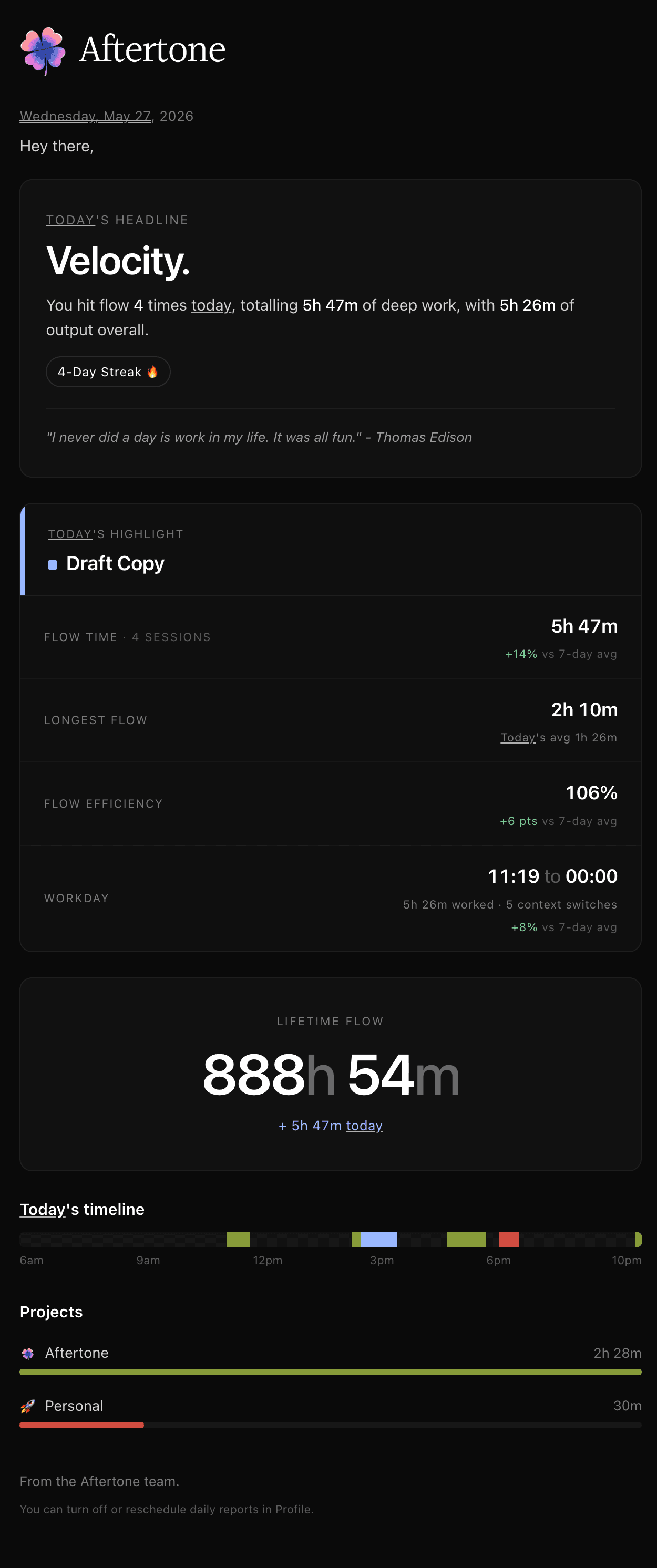
The daily report is an email sent by Aftertone each day that shows exactly how your workday went — flow sessions, output time, your highlight task, and a visual timeline of where your time went. It arrives at a time you set, so you can read it when it suits your routine.
Configuring the send time
Go to Profile → Settings and find the Daily Report option. You can set the time it arrives and toggle it on or off. Most people set it for early evening — after the workday ends but before the day is too far gone to reflect on it.
Today's headline
The report opens with a single-word headline that characterises the day — words like Traction, Momentum, or Breath based on your flow output. Below it, a one-line summary: how many times you hit flow, the total deep work time, and total output time for the day. If you are on a streak of consecutive work days, the streak count appears here too.
A short quote is included at the bottom of the headline section — a rotating selection that changes each day.
Today's highlight
The most significant task you completed during the day is surfaced as your highlight. This is based on the task that took the most focused time, giving you a single thing to point to when someone asks what you got done today.
Flow time and sessions
Flow time is the total time you spent in active, uninterrupted Focus Mode sessions during the day. The session count shows how many separate flow sessions you completed. A session ends when you take a break of more than 25 minutes or leave Focus Mode for an extended period.
Longest flow
Longest flow is the single longest uninterrupted period of focus during the day. Below it, the report shows your daily average — how your longest session today compares to your typical day. This helps you see whether you are protecting your best focus windows or letting them fragment.
Flow efficiency
Flow efficiency is the proportion of your scheduled time blocks that were spent in active focus. A score of 100% means every block you scheduled was worked. Lower scores indicate time that was blocked but not worked — meetings that ran long, tasks that were skipped, or blocks that were left on the calendar after plans changed. It is a measure of how accurately your plan reflected your day.
Workday
Workday shows the span of your working day — the time your first task started to the time your last one ended. Below that, the total time worked and the number of context switches during the day. Context switches are moments where you moved between significantly different types of work; fewer context switches generally means deeper, more sustained focus.
Lifetime flow
Lifetime flow is the running total of all focus time you have accumulated in Aftertone since you started. Each day's output adds to it. Below the total, the report shows how much today contributed. It is a long-term view of how much sustained work you have done — the kind that compounds.
Today's timeline
The timeline is a visual strip showing your entire day from 6am to 10pm. Each block of focus time appears as a coloured segment. The position and length of each segment shows when you worked and for how long. Gaps in the timeline show untracked time — where the day went between focus blocks. Reading the timeline alongside the flow efficiency score tells you whether your day was concentrated or scattered.
Projects
At the bottom of the report, time is broken down by project. Each project you worked on during the day appears with a time total and a proportional bar. This is the fastest way to see whether your time actually went where you intended it to go. If a project you consider a priority has no bar, it did not get any focused time today.
👉 Try it now — Go to Profile → Settings and confirm your daily report is turned on and set to a time that works for your routine. If you have already received one, open it and look at the project breakdown first — it is usually the most revealing section.