Evaluate
Article 1 of 1
The Weekly Report and Review
How to read your weekly report, what every metric means, and how to run a 10-minute Sunday review that makes each week better than the last.
Written By: Niall Jawad
3 min read
What We'll Cover
Where to find the weekly report
What flow sessions, peak day, streak, and longest flow tell you
The colour key for the work timeline
How to read the project breakdown
The four-step Sunday review
The three questions that improve next week
Navigating to previous weeks
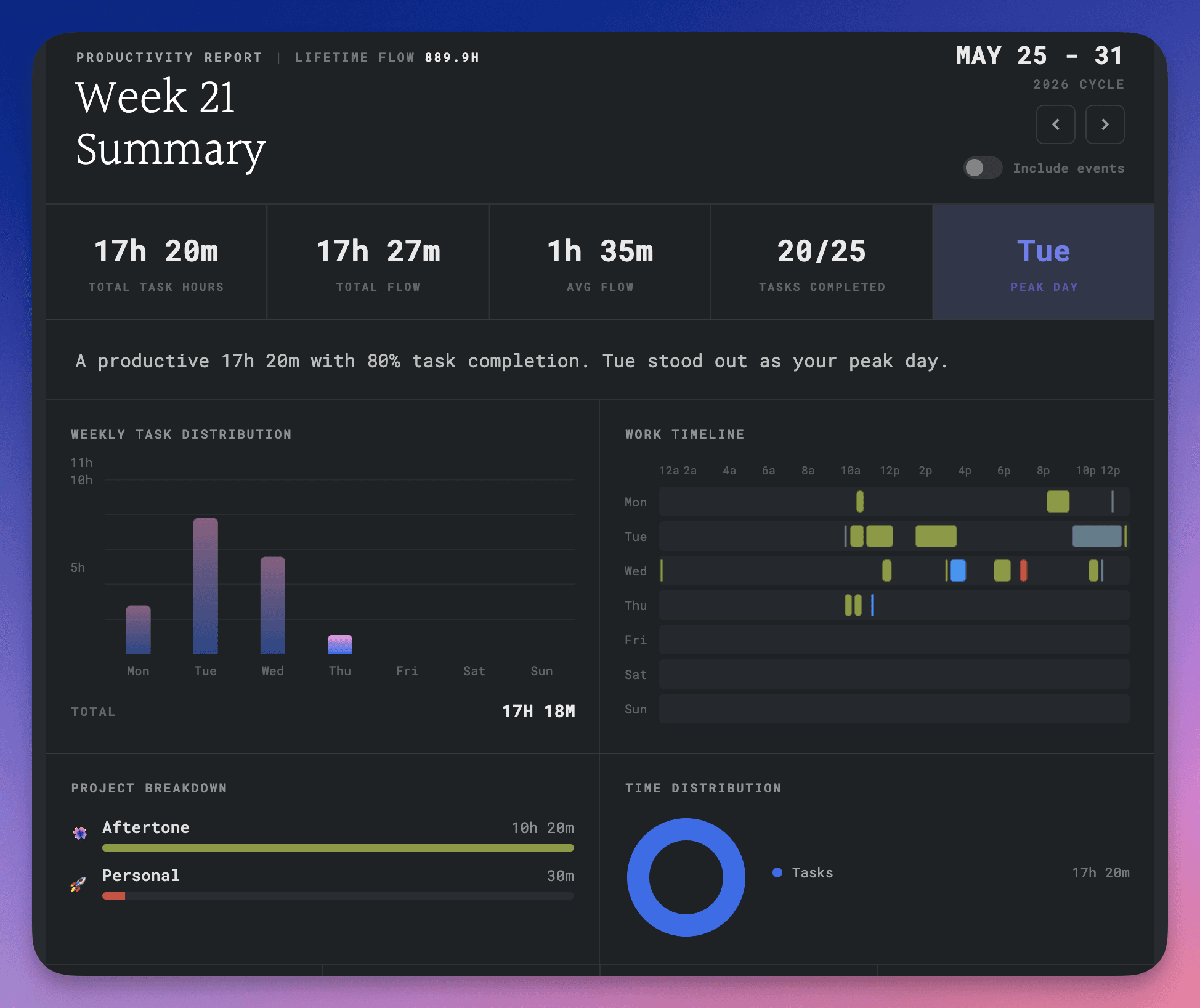
The weekly report is in the Evaluate view โ click the chart icon in the top right of the Focus Screen to open it. It shows what actually happened โ flow sessions, peak day, a full work timeline, and tasks completed โ rather than how the week felt. Users who read it consistently for four weeks average 34 percent more flow sessions than those who do not.
Flow sessions
The number of uninterrupted focus sessions you completed. A flow session counts when you work through a time block in Focus Mode without leaving early. It is a more honest measure of output than tasks completed, because tasks vary enormously in size and difficulty.
Peak day
The day of the week where you had the most flow sessions or the longest total focus time. Over several weeks this tends to settle into a consistent pattern โ most people find it is Tuesday or Wednesday. Once you know yours, schedule your most important work there and keep meetings off it where possible.
Streak
Your streak counts consecutive days on which you completed at least one task. Missing a day resets it to zero.
Longest flow
The single longest uninterrupted period in Focus Mode during the week, measured as continuous time where individual task gaps are under 15 minutes.
The work timeline
The timeline shows a visual breakdown of your day across the week. Green is completed tasks, blue is events and meetings, grey is breaks. Gaps in the timeline โ time with none of these โ show where the day went untracked. It is often the most revealing part of the report: you will see clearly whether your mornings are actually protected, and which days had almost no serious work despite feeling busy.
Tasks completed
The number of tasks completed during the week, broken down by project. Useful for tracking whether work is moving across your projects or whether one project is dominating at the expense of others.
โ ๏ธ Note โ The report is generated automatically and cannot be edited. It reflects what Aftertone recorded during your sessions.
Your weekly review
The report shows you data. The review is where you decide what to do with it. Do it Sunday evening โ reading last week's data with next week's decisions in mind means the review and the planning happen in the same session.
Step 1: Look at the numbers
Look at the three headline numbers: flow sessions, peak day, and tasks completed. Note whether they feel right given how the week felt.
Step 2: Read the work timeline
Find the gaps, the overruns, and the days where serious work did not happen. Ask: what caused those gaps? Were they planned, unexpected, or avoidable?
Step 3: Answer three questions
What was the most important thing I got done this week? What did not get done that should have? What is one thing I will do differently next week? These three questions take about two minutes to answer honestly and are worth more than an hour of journalling.
Step 4: Set up next week
Open the Planning view with Shift P and clear your inbox. Move any unfinished tasks to a specific day next week. Delete anything that is no longer relevant. Then go to the Calendar view and block time for your top three priorities for the week before you close your laptop. Finish with at least two tasks already time-blocked for Monday morning.
Why it gets more useful over time
The first review tells you little. By the fifth, patterns emerge. By the tenth, you know your rhythms, your most productive conditions, and your most reliable sources of delay.
Navigating between weeks
In the Evaluate view, use the arrow controls beside the week date to move to previous weeks and read earlier reports.
๐ Try it now โ Open the Evaluate view and read this week's report. Look at the timeline first and ask: does this match how the week felt? Then answer the three questions before you close your laptop.
The weekly report is in the Evaluate view โ click the chart icon in the top right of the Focus Screen to open it. It shows what actually happened โ flow sessions, peak day, a full work timeline, and tasks completed โ rather than how the week felt. Users who read it consistently for four weeks average 34 percent more flow sessions than those who do not.
Flow sessions
The number of uninterrupted focus sessions you completed. A flow session counts when you work through a time block in Focus Mode without leaving early. It is a more honest measure of output than tasks completed, because tasks vary enormously in size and difficulty.
Peak day
The day of the week where you had the most flow sessions or the longest total focus time. Over several weeks this tends to settle into a consistent pattern โ most people find it is Tuesday or Wednesday. Once you know yours, schedule your most important work there and keep meetings off it where possible.
Streak
Your streak counts consecutive days on which you completed at least one task. Missing a day resets it to zero.
Longest flow
The single longest uninterrupted period in Focus Mode during the week, measured as continuous time where individual task gaps are under 15 minutes.
The work timeline
The timeline shows a visual breakdown of your day across the week. Green is completed tasks, blue is events and meetings, grey is breaks. Gaps in the timeline โ time with none of these โ show where the day went untracked. It is often the most revealing part of the report: you will see clearly whether your mornings are actually protected, and which days had almost no serious work despite feeling busy.
Tasks completed
The number of tasks completed during the week, broken down by project. Useful for tracking whether work is moving across your projects or whether one project is dominating at the expense of others.
โ ๏ธ Note โ The report is generated automatically and cannot be edited. It reflects what Aftertone recorded during your sessions.
Your weekly review
The report shows you data. The review is where you decide what to do with it. Do it Sunday evening โ reading last week's data with next week's decisions in mind means the review and the planning happen in the same session.
Step 1: Look at the numbers
Look at the three headline numbers: flow sessions, peak day, and tasks completed. Note whether they feel right given how the week felt.
Step 2: Read the work timeline
Find the gaps, the overruns, and the days where serious work did not happen. Ask: what caused those gaps? Were they planned, unexpected, or avoidable?
Step 3: Answer three questions
What was the most important thing I got done this week? What did not get done that should have? What is one thing I will do differently next week? These three questions take about two minutes to answer honestly and are worth more than an hour of journalling.
Step 4: Set up next week
Open the Planning view with Shift P and clear your inbox. Move any unfinished tasks to a specific day next week. Delete anything that is no longer relevant. Then go to the Calendar view and block time for your top three priorities for the week before you close your laptop. Finish with at least two tasks already time-blocked for Monday morning.
Why it gets more useful over time
The first review tells you little. By the fifth, patterns emerge. By the tenth, you know your rhythms, your most productive conditions, and your most reliable sources of delay.
Navigating between weeks
In the Evaluate view, use the arrow controls beside the week date to move to previous weeks and read earlier reports.
๐ Try it now โ Open the Evaluate view and read this week's report. Look at the timeline first and ask: does this match how the week felt? Then answer the three questions before you close your laptop.
Related to Evaluate
Trusted by founders, developers, and independent operators
Your best work is waiting.
Try Aftertone free. See what you're capable of when nothing gets in your way.
Trusted by founders, developers, and independent operators
Your best work is waiting.
Try Aftertone free. See what you're capable of when nothing gets in your way.
Trusted by founders, developers, and independent operators
Your best work is waiting.
Try Aftertone free. See what you're capable of when nothing gets in your way.