Best Things 3 Alternatives in 2026: 9 Apps Compared
Things 3 is Apple-only with no AI or calendar. The 9 best alternatives in 2026: Aftertone, OmniFocus, Todoist, TickTick, Amazing Marvin, Sunsama.
Written By The Aftertone Team

Best Things 3 Alternatives in 2026
Quick answer: Things 3 is beautifully designed but frozen in scope — no calendar, no AI, no time blocking. The best alternative depends on what you need beyond a task list:
Aftertone — tasks + time blocking + behavioral AI + Focus Screen in one system ($30/month, Mac)
Todoist — cross-platform with AI features and 90+ integrations ($48/yr)
TickTick — tasks + calendar + habits + Pomodoro at the best price ($36/yr)
OmniFocus — the deepest GTD implementation on Apple ($10/mo)
Microsoft To Do — the best free option, especially for Microsoft/Outlook users (free)
Amie — the closest to Things 3's design quality with calendar integration (~$18/mo, Mac + iOS)
Things 3 is one of the best-designed apps ever made for Apple platforms. The interface is clean, fast, and genuinely delightful. For pure task management — capturing, organising, and checking off tasks — it's hard to beat.
But Things 3 is a task list. It doesn't block time on your calendar, doesn't protect your focus during execution, doesn't analyse your productivity patterns, and hasn't added a major feature in years. If your needs have grown beyond task management into scheduling, focus protection, or behavioral insight, Things 3 can't follow you there.
Here are the seven best Things 3 alternatives in 2026.
Why people look for Things 3 alternatives
The reasons people outgrow Things 3 are specific:
No calendar integration. Tasks and calendar live in separate worlds. You can't see whether a task fits your available time without switching apps.
No time blocking. You can't assign tasks to specific time slots. Things 3 tells you what to do but not when.
No AI features. No smart scheduling, no pattern analysis, no weekly and daily reports. Things 3 is entirely manual.
Apple only. No Windows, Android, or web app. Collaboration with non-Apple users is impossible.
Stale development. Things 3 hasn't shipped a major feature update in years. Users worry about the app's long-term trajectory.
How we evaluated these tools
We focused on tools that address Things 3's specific gaps: calendar integration, time blocking, AI features, and cross-platform support — while respecting that Things 3 users value design quality, simplicity, and honest pricing.
What Things 3 does well, and where it stops
The design is genuinely best-in-class. Quick Entry captures tasks from anywhere on Mac with a keyboard shortcut. Areas and Projects provide clean organisation. Today view surfaces what matters. The one-time purchase ($49.99 Mac + $19.99 iPhone) means no subscription fatigue. For pure task management on Apple devices, the experience is unmatched.
Where it stops: Things 3 has no concept of time. Tasks exist as items on a list with optional due dates, but there's no calendar integration, no time blocking, no sense of how long anything takes or when you'll actually do it. The gap between "knowing what to do" and "scheduling when to do it" is the gap Things 3 doesn't bridge.
At a glance: all alternatives compared
App | Price | AI scheduling | Focus tools | Free tier | Platform |
|---|---|---|---|---|---|
Aftertone | $30/month | Silent/advisory | Focus Screen | Free trial | Mac only |
OmniFocus | $9 | None | None | No | Apple only |
Todoist | Free tier | None | None | Yes | All platforms |
TickTick | Free tier available | None | Pomodoro | Yes | All platforms |
Amazing Marvin | $8/mo (annual) or $12/mo (monthly) | None | Pomodoro | No | All platforms |
Structured | Free tier | None | None | No | All platforms |
Sunsama | $20/month billed annually ($26/month monthly) | None | None | No | All platforms |
Microsoft To Do | Free | None | None | Yes | All platforms |
Amie | ~$18/month | AI event creation | None | No | Mac + iOS |
1. Aftertone — best for Mac users who want AI scheduling intelligence and a Focus Screen

Best for: Mac users who want AI that observes and reports rather than controls — keeping you in charge while surfacing the scheduling intelligence other tools don't provide
Aftertone is a Mac-native calendar and task manager built on behavioural science. Smart Capture converts pasted text or a screenshot into structured tasks instantly. Auto-Extend keeps the session running when you finish a task early. Pause holds your place. The philosophical difference from most alternatives is explicit: instead of automating your schedule, Aftertone analyses what actually happens when you execute it. The AI weekly and daily reports surface patterns across your scheduling history — which time slots produce real output, how your meeting-to-deep-work ratio trends, whether your calendar structure this week resembles your most or least productive periods. The Focus Screen supports execution: when it's time to work, everything except the current task disappears.
Pros:
AI weekly and daily reports — the only tool in this category that analyses your scheduling patterns over time
Focus Screen — narrows to the current task at execution time, removing visual load
Native task management built into the calendar view, not bolted on
Two-way Google Calendar sync
$30/month. Smart Zoning moves tasks directly onto the calendar with keyboard shortcuts. 7-day free trial, no card required.
Built on 45 principles from behavioural science and cognitive psychology
Cons:
Mac only — iOS coming; no Windows or Android currently
No auto-scheduling — Aftertone informs and improves your planning rather than making decisions for you
Individual tool only — not built for teams
Google Calendar sync only (no Outlook, no iCloud events)
Pricing: $30/month. Free trial available. 7-day free trial, no card required.
Calendars: Google Calendar (two-way sync).
Why switch from Things 3: You want to own your schedule — not outsource it — and you want honest feedback on how your weeks are actually going. Aftertone costs less than a few months of most subscriptions and compounds in value the longer you use it.
2. OmniFocus — best for Apple users who want the deepest GTD implementation
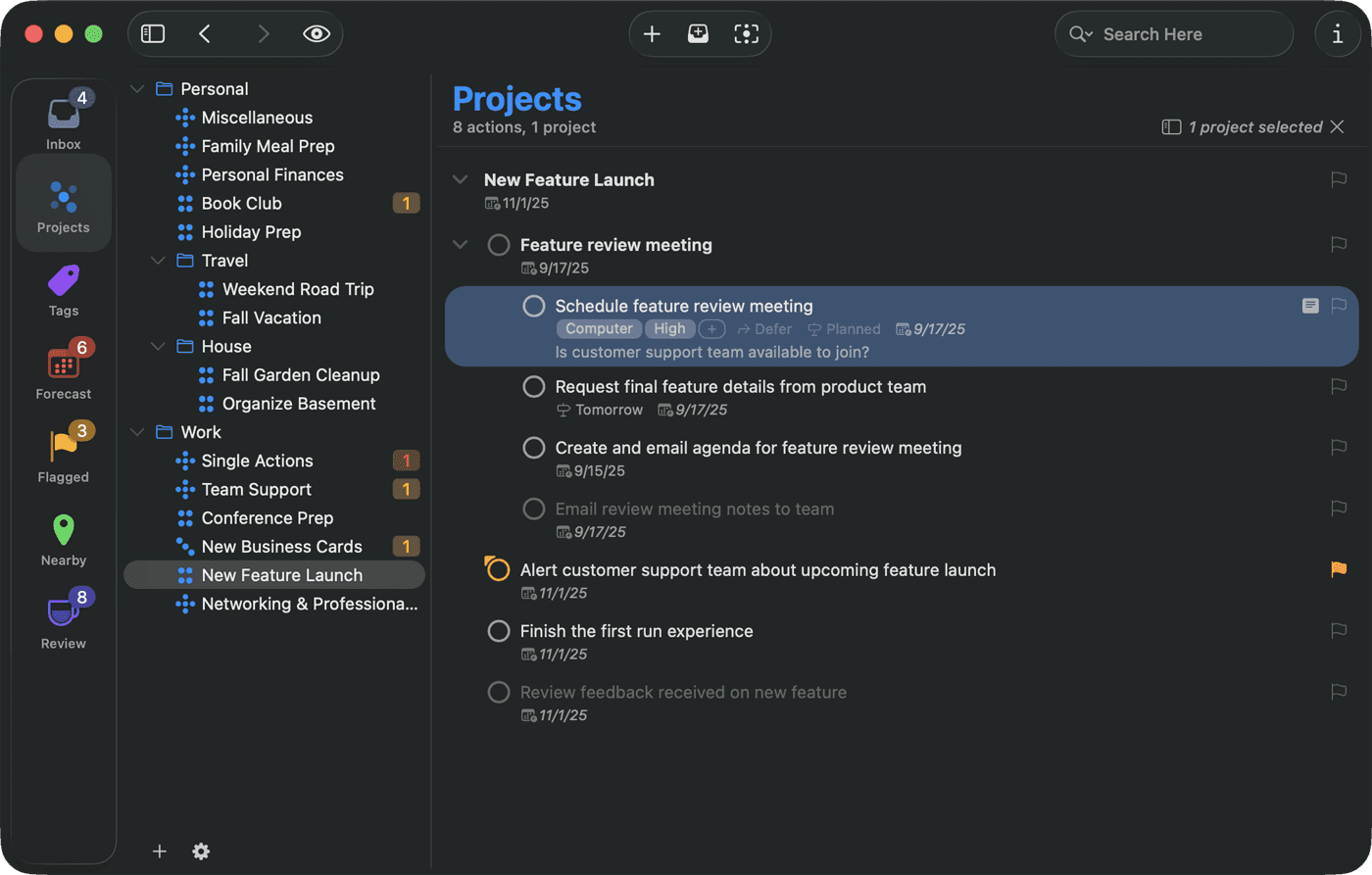
Best for: GTD practitioners who want the deepest implementation of Getting Things Done methodology on Apple platforms
OmniFocus is the power tool for GTD (Getting Things Done) practitioners. Perspectives let you create custom filtered views of your task database, forecast mode shows upcoming deadlines against your calendar, and the review system enforces the weekly review that GTD requires. It's more complex than any other task manager in this category — and that complexity serves GTD practitioners well.
Pros:
Deepest GTD implementation available — perspectives, contexts, review cycles
Forecast mode — see tasks and calendar events together on a timeline
Custom perspectives let you build any view of your task data
Apple-native — Mac, iPhone, iPad, Apple Watch
Automation via Shortcuts and OmniAutomation (JavaScript)
Cons:
$10/month subscription (or $150 one-time for Standard)
Steep learning curve — designed for GTD, overwhelming for non-GTD users
No time blocking — it's a task manager, not a calendar
Apple only — no Windows, Android, or web
No AI features
Pricing: $9.99/month or $99.99/year. Standard one-time purchase available (~$150).
Calendars: Reads calendar events in Forecast view. No calendar sync.
Why switch from Things 3: OmniFocus takes a different approach that may better fit your specific workflow and priorities.
3. Todoist — best cross-platform task management with natural language input
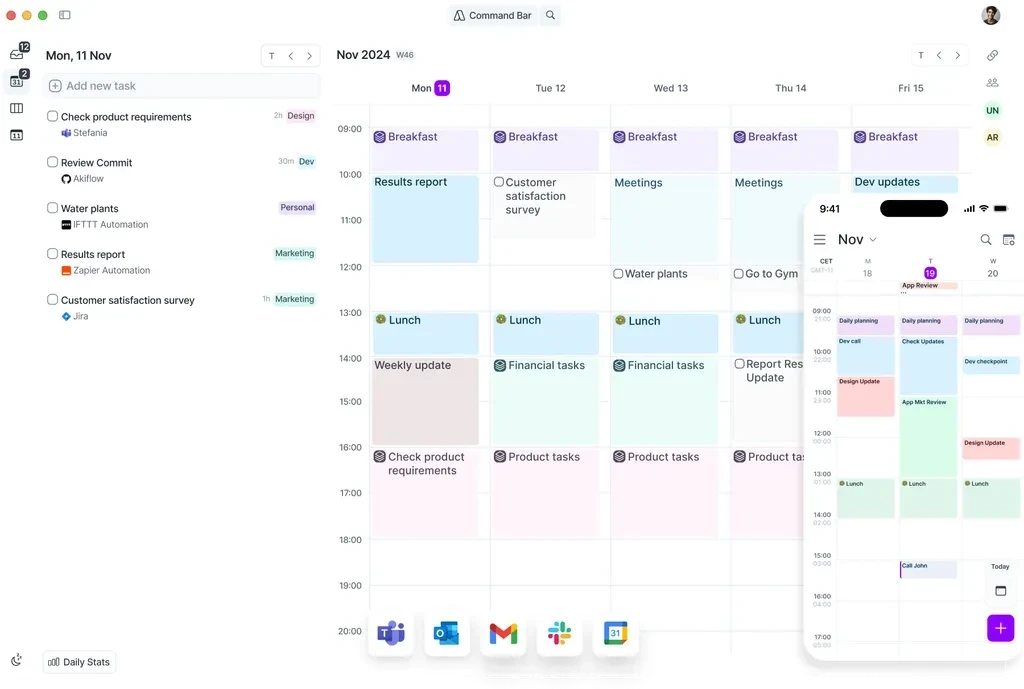
Best for: Cross-platform task management with natural language input, massive integration ecosystem, and a genuine free tier
Todoist is the most widely used task manager in the world. Natural language input ("Submit report every Friday at 3pm #work p1") makes task creation fast. 90+ integrations connect it to virtually every tool in your stack. The free tier is genuinely functional for personal use. Todoist AI (assistant features) adds smart scheduling suggestions and task decomposition.
Pros:
Natural language task creation — fast and intuitive
90+ integrations with every major productivity tool
Cross-platform: Mac, Windows, Linux, iOS, Android, web
Genuine free tier for personal use
Todoist AI for smart scheduling suggestions
Team/shared projects with comments and assignments
Cons:
No time blocking — it's a task list, not a calendar
No Focus Screen or execution support
No AI analysis of productivity patterns
Calendar integration is view-only (no native time blocking)
Pricing: Free tier. Pro: $5/mo or $48/year. Business: $8/user/mo.
Calendars: Google Calendar, Outlook (view events in Todoist, not full sync).
Why switch from Things 3: Todoist takes a different approach that may better fit your specific workflow and priorities.
4. TickTick — best value with tasks, calendar, habits, and Pomodoro in one app
Best for: Users who want the best feature-to-price ratio — task management, calendar, habits, and Pomodoro in one affordable app
TickTick combines task management, calendar view, habit tracking, and a Pomodoro timer in one app at a fraction of what competitors charge. The calendar view lets you drag tasks into time slots for basic time blocking. Cross-platform support is excellent — Mac, Windows, iOS, Android, web, and browser extensions.
Pros:
Task management + calendar + habits + Pomodoro timer in one app
Excellent cross-platform support including Apple Watch
Calendar view with drag-and-drop time blocking
Very affordable at $35.99/year
Natural language task input
Collaboration and shared lists
Cons:
No AI behavioral analysis or weekly and daily reports
No Focus Screen — only a basic Pomodoro timer
Calendar view is basic compared to dedicated calendar apps
Free tier has meaningful limitations
Pricing: Free tier available. Premium: $3.99/mo or $35.99/year.
Calendars: Google Calendar, Outlook (in calendar view).
Why switch from Things 3: TickTick takes a different approach that may better fit your specific workflow and priorities.
5. Amazing Marvin — best for users who want maximum customisation of their productivity system
Best for: Users who want maximum customisation — 94+ toggleable productivity strategies that let you build a system tailored to how your brain works
Amazing Marvin is the most customisable task manager available. It offers 94+ toggleable "strategies" — features you can turn on or off to build a productivity system that matches your cognitive style. Time blocking, Pomodoro timers, daily limits, gamification, priority matrices, and dozens more can be mixed and matched.
Pros:
94+ toggleable strategies — build exactly the system you need
Day view with time blocking and calendar integration
Particularly popular with ADHD users for its flexibility
Daily task limits prevent overcommitment
Available on Mac, Windows, iOS, Android, web
Cons:
$8–12/month — moderate ongoing cost
Overwhelming number of options for users who want simplicity
No AI behavioral analysis or weekly and daily reports
Setup requires significant time investment
Pricing: $8/mo (annual) or $12/mo (monthly). $300 lifetime option occasionally available.
Calendars: Google Calendar, Outlook.
Why switch from Things 3: Amazing Marvin takes a different approach that may better fit your specific workflow and priorities.
6. Structured — best visual timeline planner for Apple users
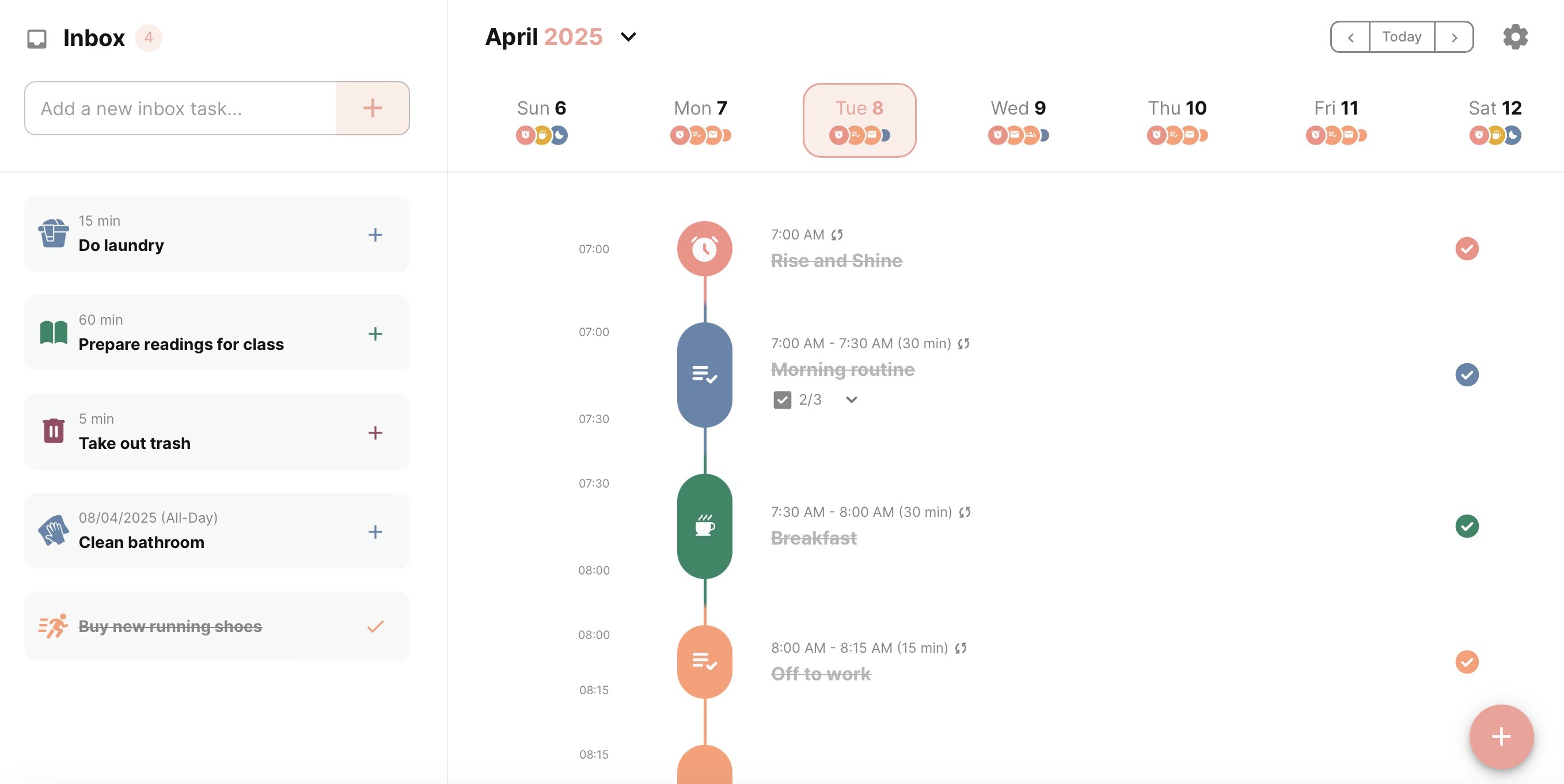
Best for: Visual thinkers who want a simple timeline view of their day with drag-and-drop task scheduling on Apple devices
Structured presents your day as a clean visual timeline — tasks and events stacked vertically with colour-coded blocks. Drag tasks up and down to reschedule. The simplicity is the point: no AI, no complex integrations, just a visual day plan you can build and adjust in seconds.
Pros:
Visual timeline makes your day structure immediately clear
Simple drag-and-drop scheduling
Lifetime purchase option at $64.99 — no subscription needed
Apple-native: Mac, iPhone, iPad, Apple Watch
Import events from Apple Calendar and Google Calendar
Cons:
No AI features of any kind
No deep calendar sync — imports events but doesn't fully integrate
No productivity analysis or weekly and daily reports
Apple only — no Windows or Android
Limited task management compared to Todoist or Things 3
Pricing: Free tier. Pro: $6.49/mo, $19.99/yr, or $64.99 lifetime.
Calendars: Apple Calendar, Google Calendar (import).
Why switch from Things 3: Structured takes a different approach that may better fit your specific workflow and priorities.
7. Sunsama — best for intentional guided daily planning across all platforms
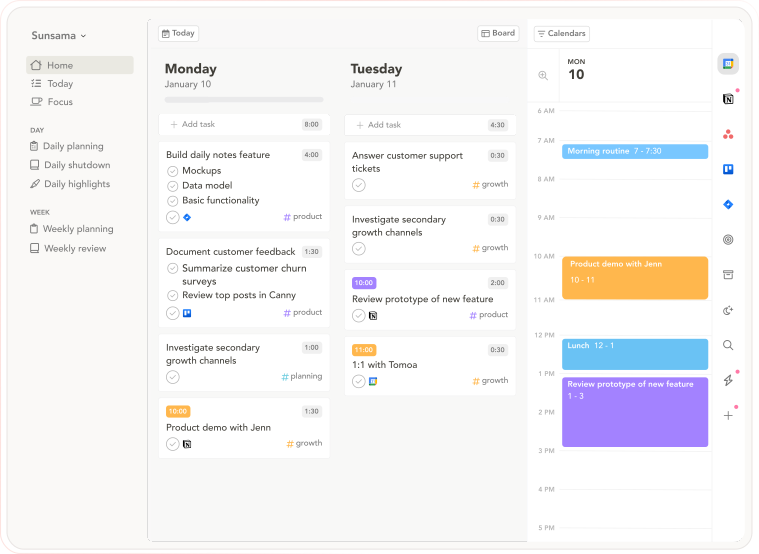
Best for: People who want intentional daily planning as a deliberate counterpoint to automated scheduling — slow, guided, and ritualistic
Sunsama is the philosophical opposite of auto-scheduling tools: instead of AI building your day, Sunsama walks you through building it deliberately yourself. The morning ritual asks you to pull tasks from connected tools, estimate time against your calendar, and commit to the plan. The evening shutdown reviews completion. The commitment is the point — you chose it, which preserves the psychological ownership that automation removes.
Pros:
Guided daily planning ritual — pulls tasks from connected tools, estimates time, locks in a realistic day
Daily Shutdown feature — structured end-of-day review and reflection
Integrations with Asana, Trello, Notion, ClickUp, Todoist, Gmail, Slack, Linear, Jira
Cross-platform: macOS, Windows, web, iOS, Android
14-day free trial, no credit card required
Cons:
$20/month annually — expensive for a planning layer
No AI auto-scheduling — everything is manual
The daily ritual takes 15–20 minutes; speed-oriented users find it slow
No AI analysis of historical scheduling patterns
Pricing: $20/month billed annually ($26/month monthly). 14-day free trial, no credit card required.
Calendars: Google Calendar, Outlook.
Why switch from Things 3: Sunsama takes a different approach that may better fit your specific workflow and priorities.
8. Microsoft To Do — best free alternative, especially for Microsoft ecosystem users
Best for: Things 3 users who need cross-platform access at zero cost, or who work in a Microsoft/Outlook environment and want seamless integration.
Microsoft To Do is the free task manager built into Microsoft 365. It's available on every platform — Mac, Windows, iOS, Android, and web — and integrates with Outlook tasks, Microsoft Planner, and Teams. The design is clean and minimal, the free tier is unlimited, and there are no subscription tiers for individual use.
Honestly: Microsoft To Do won't feel like a design upgrade from Things 3. The interface is functional rather than delightful. But for Things 3 users whose primary problem is Apple-only access or cost, it covers both at zero ongoing expense. It's also the most sensible choice for users who already live in Microsoft tools — Outlook, Teams, OneNote — where the native integration removes friction entirely.
Pros:
Completely free — no tiers, no limits for individual use
Available on every platform including Windows and Android
Deep integration with Outlook, Microsoft Planner, and Teams
My Day view provides a daily planning surface alongside task lists
Cons:
Design is functional, not delightful — a clear step down from Things 3's aesthetic
No GTD-style Area-Project-Task hierarchy like Things 3
No calendar integration, no time blocking, no AI scheduling
Limited for users outside the Microsoft ecosystem
Pricing: Free. No paid tiers for individual use.
Platforms: Mac, Windows, iOS, Android, web.
Why choose it over Things 3: Zero cost, every platform, and native Microsoft integration. The right choice for users who primarily need to escape Apple-only access rather than add AI or calendar features.
9. Amie — best for Things 3 users who value design and want calendar integration
Best for: Things 3 users who value design quality above all else and want a calendar-integrated alternative — an app that approaches Things 3's visual polish while adding the task-calendar bridge Things 3 lacks.
Amie is a Mac and iOS productivity app that combines calendar, tasks, and contacts in a single beautifully designed interface. For Things 3 users specifically, it's worth knowing that among Things 3 alternatives, Amie is consistently cited as "the only one that comes close to Things 3's design quality." The animations are considered, the typography is careful, and the interface is calm rather than feature-cluttered.
The distinctive addition: Amie shows who you spend time with alongside what you're doing — a contacts layer integrated with the calendar. For users who aren't driven by relationship tracking, this is irrelevant. For consultants, advisors, and founders who are, it surfaces something every other app treats as invisible.
Pros:
Closest to Things 3's design quality among all cross-app alternatives
Task-calendar integration — drag tasks onto your calendar directly
Contacts layer — shows who you spend time with alongside what you're doing
Natural language event and task creation
Native Mac and iOS apps
Cons:
~$18/month — the most expensive task-focused alternative on this list
Mac and iOS only — no Windows, Android, or web
Smaller company — platform longevity risk
No AI scheduling analysis or weekly review
Pricing: ~$18/month. Free trial available.
Platforms: Mac, iOS.
Why choose it over Things 3: You want Things 3's design sensibility with the task-calendar bridge Things 3 doesn't have — and you're prepared to pay more for the aesthetic that most cross-platform alternatives sacrifice.
Who Things 3 is still right for
If your workflow genuinely only requires a task list — you don't need time blocking, calendar integration, or AI features — Things 3 remains the most beautifully designed option on Apple platforms. The one-time purchase and zero-complexity approach serve users who want to capture and check off tasks without any planning overhead.
Frequently asked questions
What is the best Things 3 alternative in 2026?
It depends on what you need beyond Things 3's task list. For cross-platform access at zero cost, Microsoft To Do. For the best cross-platform paid option with natural language input, Todoist ($4/month). For the closest design match with calendar integration, Amie (~$18/month, Mac and iOS). For Apple users who want deeper GTD, OmniFocus ($10/month). For Mac users who want time blocking, focus protection, and AI scheduling intelligence, Aftertone ($30/month). The right choice maps to which specific Things 3 limitation is most painful for you.
Is there a free Things 3 alternative?
Yes — several. Microsoft To Do is completely free with no tier limitations and works on every platform. Todoist's free tier covers unlimited tasks and 5 active projects. TickTick's free tier includes 9 lists and basic task management. Apple Reminders is free and built into every Apple device — significantly improved in recent iOS versions and a reasonable option for users who only need simple lists. For a complete system, Aftertone offers a 7-day trial and Sunsama offers 14 days.
Which Things 3 alternative works best on Mac?
Aftertone is the strongest Mac-native task and calendar system — built specifically for macOS with a Focus Screen, native Google Calendar sync, and AI weekly and daily reports on scheduling patterns. OmniFocus is the strongest Mac-native pure task manager for GTD practitioners. Amie is the best for design-conscious Mac users who want calendar integration alongside tasks. All three are native Mac apps; the right choice depends on whether your bottleneck is scheduling intelligence, GTD depth, or design quality.
How much does Aftertone cost?
Aftertone is $30/month with a 7-day free trial, no card required. It covers calendar and task management in one native Mac app, plus a Focus Screen for single-task execution and AI weekly and daily reports on scheduling patterns. Things 3 is $49.99 Mac one-time — so Aftertone costs more on an annual basis but replaces both a task manager and a calendar tool while adding the AI analysis layer.
What is the best Things 3 alternative for Windows?
Todoist is the best Windows alternative — it's the most similar in terms of clean individual task management, available on Windows natively, with natural language input and 80+ integrations. The free tier covers most needs; Pro is $4/month. Microsoft To Do is the best free option if you're already in the Microsoft ecosystem. TickTick is the best value option — tasks, habits, Pomodoro, and calendar view for $3/month — and is available natively on Windows.
