Best Structured App Alternatives in 2026: 9 Apps Tested
Structured is iOS-only with no Mac app or longitudinal analysis. The 9 best alternatives in 2026: Sorted 3, Tiimo, Sunsama, TickTick, Things 3, Todoist, Motion, Aftertone, and Fantastical — compared by platform, AI depth, and planning style.
Written By The Aftertone Team

Best Structured App Alternatives in 2026
The best Structured app alternative depends on what you're missing: Sorted 3 for Mac and cross-platform timeline planning, Sunsama for intentional daily planning with tool integrations, Tiimo for neurodivergent-designed visual planning, and Aftertone for Mac users who want AI analysis of scheduling patterns over time.
Structured solved a specific problem most productivity apps ignore: the calendar grid is a poor representation of how a day feels. Hours aren't equal — a block of time at 9am has different texture than one at 2pm. Structured's visual timeline makes your day's shape legible in a way that a to-do list and a standard calendar view, used separately, never quite achieve.
The iPhone App of the Year 2025 award and over one million downloads reflect an audience that found this visual clarity genuinely useful. But Structured has deliberate constraints. It's iOS and iPadOS only — no Mac app, no Android, no web version. It requires manual task entry. And its intelligence stops at today: it visualises your day but has no mechanism to analyse whether your pattern of days, across weeks and months, is building toward your most productive conditions.
Research by Acuity Training found that only 18% of working people have a proper time management system — visual planners like Structured exist precisely to close that gap. Here are the best Structured alternatives in 2026, by the specific gap you're trying to close.
Why people look for Structured alternatives
iOS only, no cross-platform support — there is no Mac app, no Android version, no web access. If you use any non-Apple device or want to plan at your desk, Structured simply isn't available.
Manual task entry only — Structured doesn't read your email, pull from project management tools, or auto-capture tasks. Every item must be entered manually.
No longitudinal analysis — the visual timeline shows today clearly, but Structured has no mechanism to surface what your scheduling patterns reveal across weeks or months. Attention residue research shows that patterns across sessions matter as much as individual session quality — without longitudinal data, those patterns stay invisible.
Limited project management depth — no subtasks, no complex recurring task rules, no project hierarchies for multi-week work.
Quick-pick: which alternative fits your situation
Need the same visual timeline on Mac, Android, and web → Sorted 3
Neurodivergent user who needs compassionate, ADHD-designed planning → Tiimo
Want an intentional daily planning ritual across all your tools → Sunsama
Need cross-platform task management on a budget → TickTick or Todoist
Want the best personal task manager with no subscription → Things 3 (Apple only)
Want AI to auto-schedule your day instead of building it manually → Motion
Want AI analysis of your scheduling patterns plus a Focus Screen → Aftertone (Mac)
Want the best Apple calendar experience with natural language input → Fantastical
At a glance: all alternatives compared
App | Price | Visual timeline | Cross-platform | AI features | Best for |
|---|---|---|---|---|---|
Structured | Free / $9.99/yr or $49.99 lifetime | Yes (core feature) | iOS/iPadOS only | Basic AI planner | Visual daily planning on Apple |
Sorted 3 | Free / subscription | Yes (timeline) | Mac + iOS | Magic hour capacity check | Hyper-scheduling on Apple |
Tiimo | $4.99/mo | Yes (compassionate design) | iOS + Apple Watch | Co-Planner AI | Neurodivergent users |
Sunsama | $20/mo (annual) | Time blocks in calendar | All platforms | None | Intentional daily planning ritual |
TickTick | Free / $3/mo | Calendar view only | All platforms | Basic AI | Cross-platform budget pick |
Things 3 | $49.99 one-time (Mac) | No | Apple only | None | Best personal task manager, no subscription |
Todoist | Free / $4/mo | No | All platforms | Basic AI assist | Simple cross-platform task management |
Motion | $19/mo (annual) | No | All platforms | Full auto-scheduling | AI builds your day automatically |
Aftertone | $30/mo | Calendar + task view | Mac only | AI weekly + daily reports | Scheduling pattern analysis + Focus Screen |
Fantastical | $57/yr | No | Apple only | None | Best Apple calendar with NLP |
1. Sorted 3 — best visual timeline alternative with Mac and iOS support
Best for: Structured users who want the same hyper-scheduling, timeline-based approach on Mac as well as iPhone — without switching to an entirely different planning philosophy.
Sorted 3 is the closest philosophical match to Structured among alternatives. You capture tasks, assign start times and durations, and see the result as a chronological timeline alongside your calendar events. The Magic Hour feature calculates whether your total task load fits within the available day — the same overcommitment signal that Structured's visual block density implies, but calculated explicitly.
Where Sorted 3 differs: the interface is text-based rather than visual-block based, which some users find faster for input and others find less satisfying than Structured's draggable blocks. The important addition is Mac support — Sorted 3 runs natively on both Mac and iPhone, which Structured does not.
Pros:
Native Mac app — the most direct Structured equivalent that works on desktop
Magic Hour capacity check — explicit calculation of whether your task load fits the day
Chronological timeline view alongside calendar events
Natural language task entry
Free tier available
Cons:
Text-based timeline rather than visual drag-and-drop blocks — different feel from Structured
Apple only — no Android or web
No longitudinal pattern analysis or weekly review
Smaller developer — less frequent updates than top-tier apps
Pricing: Free tier available. Subscription for full features (check current pricing at staysorted.com).
Platforms: Mac, iPhone, iPad.
2. Tiimo — best for neurodivergent users who need compassionate visual daily planning
Best for: ADHD, autism spectrum, dyslexia, and anxiety users who want a visual daily planner designed from the ground up for executive function support — not adapted for it as an afterthought. Prospective memory research — remembering to do things at future times — sits at the core of why visual timelines help neurodivergent users more than list-based tools.
Tiimo is the closest comparison to Structured in visual philosophy, with a fundamentally different emotional register. Where Structured is designed for focused high performers, Tiimo was co-designed with clinical psychologists, ADHD coaches, and autism experts specifically for neurodivergent users — not adapted from a general-purpose planner but built from the ground up with that audience as the primary brief. The visual icons, colour coding, compassionate tone, and Co-Planner AI reduce cognitive load in ways that performance-focused design doesn't.
Tiimo won Apple's iPhone App of the Year 2025 alongside Structured, which reflects how both apps serve distinct audiences who share a love of visual daily structure. If you use Structured because it makes the day's shape visible and manageable rather than because you're optimising peak performance, Tiimo may be a better fit.
Pros:
Co-designed with ADHD and autism experts — neurodivergent support is the core, not a feature
Co-Planner AI helps structure your day based on your conditions and energy
Visual icons, colour coding, and compassionate tone reduce cognitive load
Focus timers, routines, and progress visualisation built in
Apple Watch support for time-awareness on the go
Cons:
iOS and Apple Watch only — no Mac app, no Android, no web
$4.99/month — more expensive than Structured's $29.99/year at monthly billing
No longitudinal pattern analysis or weekly review
Pricing: $4.99/month or annual option. Free trial available.
Platforms: iPhone, iPad, Apple Watch.
3. Sunsama — best for intentional daily planning across all your tools and platforms
Best for: Structured users who want to expand from visual day planning on iPhone to an intentional daily planning ritual that pulls tasks from Asana, Notion, Linear, GitHub, Gmail, Slack, and more — across Mac, Windows, and web.
Sunsama is the cross-platform alternative for Structured users who've outgrown manual iOS planning. The morning ritual pulls tasks from all connected tools, lets you estimate time against your calendar, and prevents overcommitment through visible workload limits. The daily shutdown ritual closes the work session deliberately. The philosophy is explicit: intentional daily planning as a counterpoint to reactive work.
The key difference from Structured: Sunsama is calendar-first and cross-platform, with a 15–20 minute guided ritual rather than a visual drag-and-drop timeline. For users who want one planning ritual that works across all devices and integrates all their task sources, Sunsama closes the gaps Structured doesn't address.
Pros:
Available on Mac, Windows, web, iOS, and Android — true cross-platform
Integrates tasks from Asana, Linear, Notion, GitHub, Gmail, Slack, Todoist, ClickUp, Jira
Guided morning planning ritual with workload limits to prevent overcommitment
Daily shutdown ritual for deliberate end-of-day review
14-day free trial, no credit card required
Cons:
$20/month annually — the most expensive alternative on this list
No visual block timeline — time blocks sit in the calendar, not a Structured-style visual view
The 15–20 minute planning ritual is a feature for some users and a friction point for others
No AI scheduling or pattern analysis
Pricing: $20/month billed annually ($26/month monthly). 14-day free trial, no card required.
Platforms: Mac, Windows, web, iOS, Android.
4. TickTick — best cross-platform alternative on a budget
Best for: Structured users who need task management and daily planning that works on every device — iPhone, Android, Mac, Windows, and web — without Structured's iOS-only constraint, at minimal cost.
TickTick is the most feature-complete budget option for cross-platform daily planning. Natural language input, recurring tasks, a built-in Pomodoro timer, Eisenhower Matrix prioritisation view, habit tracking, and calendar integration all live in a single app. The free tier covers most individual use cases; the Premium upgrade at ~$3/month adds calendar views, custom smart lists, and timeline features.
TickTick doesn't have a visual block timeline like Structured — it's primarily a task manager with a calendar layer. But for users who want to move beyond iOS-only planning and need something that works reliably everywhere at low cost, it's the strongest cross-platform option in the budget tier.
Pros:
Available on all platforms — iPhone, Android, Mac, Windows, web, Apple Watch
Built-in Pomodoro timer — no separate focus app needed
Eisenhower Matrix view for priority sorting
Habit tracking alongside task management
Free tier is genuinely usable; Premium ~$3/month
Cons:
No visual block timeline — less visual than Structured
No calendar-first planning — task list with calendar integration, not the reverse
No longitudinal pattern analysis or weekly review
Chinese-owned (Appest) — data privacy consideration for some users
Pricing: Free tier. Premium ~$35.99/year (~$3/month).
Platforms: iPhone, Android, Mac, Windows, web, Apple Watch.
5. Things 3 — best personal task manager with no subscription (Apple only)
Best for: Apple-ecosystem Structured users who want the best-designed personal task manager without a subscription, and who manage projects as well as daily tasks.
Things 3 is consistently rated the best personal task manager on Apple platforms by users who've tried everything else. The Area-Project-Task hierarchy maps naturally to how knowledge workers think: areas of ongoing responsibility, projects within those areas, and specific next actions inside each. The design is among the most considered in the category — calm, fast, and keyboard-friendly.
The one-time purchase model ($49.99 Mac, $9.99 iPhone) is particularly appealing for users already managing multiple SaaS subscriptions. Things 3 has no subscription. You own it. It's been actively maintained and updated by Cultured Code for over a decade.
Pros:
One-time purchase — no ongoing subscription cost
Best-in-class design for Apple platforms — calm, fast, keyboard-driven
Area-Project-Task hierarchy for managing responsibilities beyond daily tasks
Natural language date and time entry
Reliable iCloud sync across Mac, iPhone, iPad, and Apple Watch
Cons:
Apple only — no Android, no Windows, no web
No visual block timeline
No calendar integration that brings events into the task view
No AI features of any kind
Pricing: $49.99 Mac (one-time). $9.99 iPhone (one-time). $19.99 iPad (one-time).
Platforms: Mac, iPhone, iPad, Apple Watch.
6. Todoist — best simple cross-platform task management
Best for: Structured users who primarily want reliable task capture and daily management across every device at minimal cost, without the visual timeline format.
Todoist has been around since 2007 and is used by over 40 million people. The reason is simple: it works everywhere, and entering tasks is nearly frictionless. Type "finish report tomorrow at 3pm p1 #work" and Todoist parses the task, due date, time, priority, and project tag automatically. The interface stays minimal as the list grows.
For Structured users whose primary frustration is iOS-only access and manual entry, Todoist solves both: it's available on every platform and integrates with most productivity tools for task import. The free tier covers unlimited tasks and projects for individual users. The Pro plan at $4/month adds reminders, recurring due dates by completion, and productivity tracking.
Pros:
Available on every platform — iPhone, Android, Mac, Windows, web, Apple Watch
Best natural language task input in the category
80+ integrations — pulls tasks from email, Slack, and project management tools
Free tier genuinely useful; Pro $4/month
Cons:
No visual block timeline
No calendar-first planning view
No AI scheduling or pattern analysis
Task list without the scheduling layer Structured provides
Pricing: Free. Pro $4/month annual.
Platforms: iPhone, Android, Mac, Windows, web, Apple Watch.
7. Motion — best for AI that builds your daily schedule automatically
Best for: Structured users who want the daily schedule built for them by AI rather than manually constructed each morning — especially those with heavy task loads and volatile calendars.
Motion is the automation escalation for Structured users who want to remove the manual planning step entirely. Where Structured gives you the tools to build a great day, Motion builds the plan automatically from your tasks and meetings. Add tasks with deadlines and priorities; Motion places them in your calendar and reschedules the cascade when meetings appear or priorities change.
The trade is control: Motion's schedule is AI-generated and may not reflect exactly when you want to do things. At $19/month annually it's also significantly more expensive than Structured. But for users who find Structured's manual entry time-consuming and want the plan assembled for them, Motion addresses that constraint directly.
Pros:
Full AI auto-scheduling — plan built automatically, no manual morning planning session
Reschedules automatically when tasks change or meetings appear
Built-in project and task management
Available on Mac, Windows, iOS, and Android
Cons:
No visual block timeline — AI-generated calendar view, not Structured's design
$19/month — most expensive alternative here at annual billing
Steep setup — needs task and project configuration before the automation works well
AI makes decisions you may not endorse
Pricing: $19/month individually (annual). Team plans from $12/member/month.
Platforms: Mac, Windows, iOS, Android.
8. Aftertone — best for scheduling pattern analysis and Focus Screen on Mac

Best for: Mac users who want AI weekly pattern reports alongside daily planning — the analytical intelligence that sits above Structured's timeline approach, operating at the weekly and monthly timescale rather than the daily one.
Aftertone is a Mac-native calendar and task manager built on behavioural science. The distinction from Structured is the temporal dimension: Structured makes today visually legible. Aftertone makes your weeks, analysed over time, analytically legible.
The AI weekly and daily reports read your scheduling history and surface what no daily timeline can — including the hidden cost of task switching that accumulates across fragmented weeks: which week structures tend to produce your most focused days, how your meeting density has been trending across the past month, whether the gap between your planned schedule and your historically productive periods is widening or narrowing. The Focus Screen narrows the interface to the current task during work sessions, removing every competing demand at the moment of execution.
Pros:
AI weekly and daily reports — longitudinal pattern analysis Structured cannot provide
Focus Screen — single-task execution environment during work sessions
Native Mac calendar and task management in one app
Smart Capture converts pasted text or screenshots into structured tasks instantly
7-day free trial, no card required
Cons:
Mac only — no iOS, no Android, no Windows
No visual block timeline — calendar and task view rather than Structured's design
$30/month — the premium end of this list
Google Calendar sync only (no iCloud or Outlook)
Pricing: $30/month. 7-day free trial, no card required.
Platforms: Mac only.
9. Fantastical — best Apple-native calendar with natural language event creation
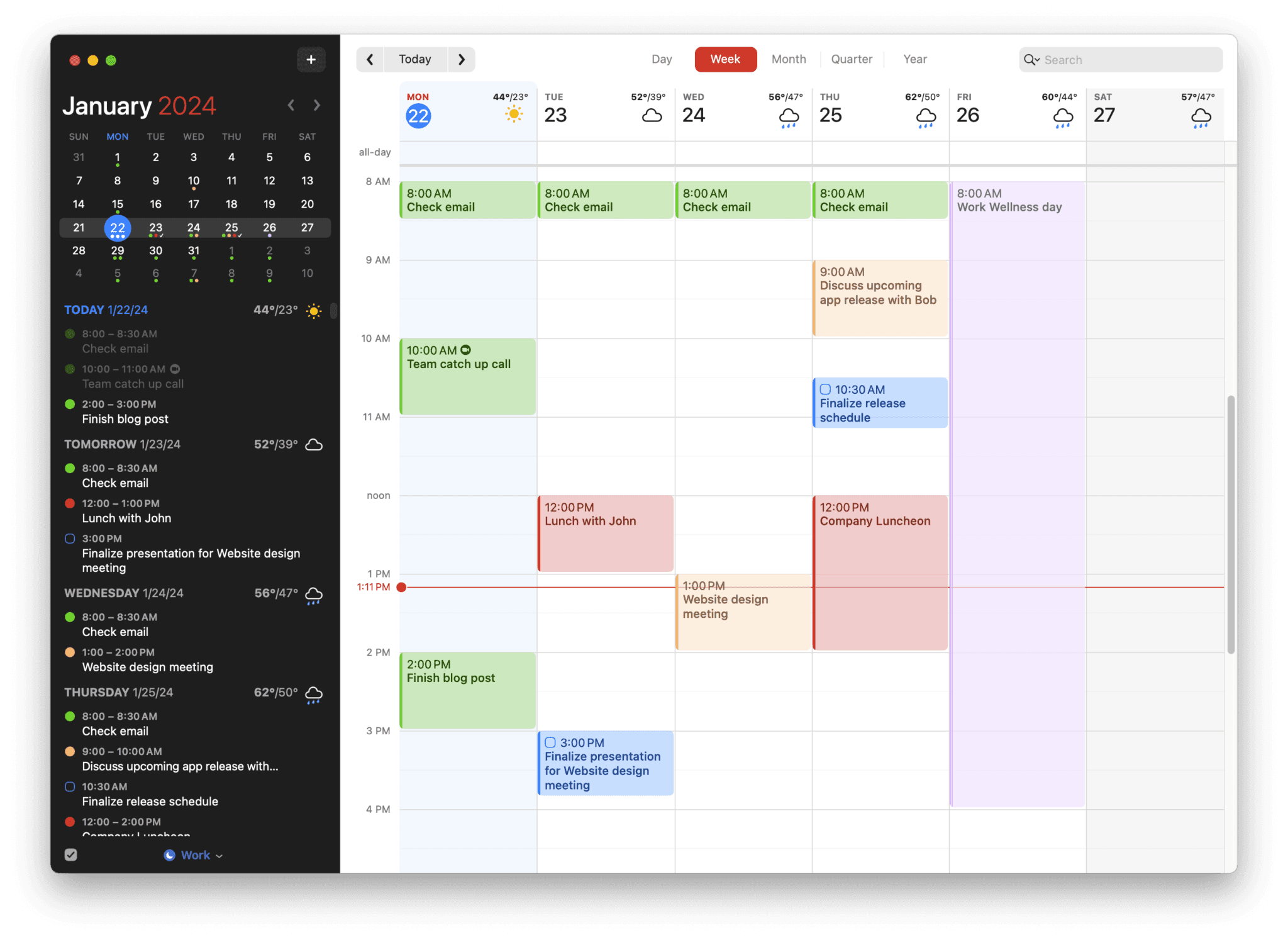
Best for: Structured users whose primary need is a better calendar — not a better task timeline — with the best natural language event entry available and deep Apple ecosystem integration.
Fantastical addresses a different gap from Structured. Where Structured is task-and-timeline-first, Fantastical is calendar-first. For users whose frustration with Structured is that it sits alongside their calendar rather than integrating deeply with it, Fantastical provides that integration with the best NLP event creation in the category.
Pros:
Best natural language event entry — fastest event creation available on Apple
Deep Apple ecosystem: Siri, Apple Watch, Focus modes, Spotlight, widgets
Calendar sets for switching between work/personal contexts
Scheduling proposals for finding meeting times
Cons:
Calendar-first, not task-timeline — doesn't replace Structured's visual daily planning
$57/year — more expensive than Structured
Apple ecosystem only — no Android or Windows
No AI scheduling or pattern analysis
Pricing: $57/year ($4.75/month annual). Free basic tier available.
Platforms: Mac, iPhone, iPad, Apple Watch.
Who Structured is actually right for
Structured is right for visual thinkers who want the day's shape to be immediately legible — who find that seeing coloured blocks of time communicates their schedule more effectively than a list or a grid. The iPhone App of the Year award reflects genuine execution quality. For users who've tried standard calendars and to-do lists and found the combination insufficient, Structured's unified visual timeline often provides the clarity they were looking for.
The honest ceiling: Structured makes today legible. It is iOS-only, requires manual entry, and offers no longitudinal analysis. If any of those constraints are your actual problem, one of the nine alternatives above addresses it directly.
Frequently asked questions
What is the best Structured app alternative in 2026?
It depends on what you're missing. For Mac and iPhone support with a similar timeline approach, Sorted 3 is the closest match. For intentional daily planning across all platforms with tool integrations, Sunsama. For cross-platform budget task management, TickTick or Todoist. For AI auto-scheduling, Motion. For scheduling pattern analysis on Mac, Aftertone. For neurodivergent-designed visual planning, Tiimo. There's no single best alternative — the right one depends on which of Structured's gaps is your actual constraint.
Is there a free Structured app alternative?
Yes — several. Sorted 3 has a free tier. Todoist's free tier covers unlimited tasks and projects. TickTick's free tier is genuinely usable for individual planning. Google Calendar is free and handles basic daily planning. Fantastical has a limited free tier. Most full-featured paid alternatives offer free trials: Sunsama offers 14 days, Motion 7 days, Aftertone 7 days.
Does Structured have a Mac or Android app?
No — Structured is iOS and iPadOS only. There is no Mac desktop app, no Android version, and no web interface. If you need to plan at your desk on Mac or use an Android phone, you'll need an alternative. Sorted 3 is the closest equivalent with a native Mac app. Sunsama, TickTick, and Todoist all offer true cross-platform support including Android and Windows.
Which Structured alternative works on Android?
Sunsama, TickTick, Todoist, and Motion all have Android apps. Sunsama is the best choice for intentional daily planning on Android. TickTick is the best budget option. Todoist is the simplest cross-platform task manager. Motion is the best for full AI auto-scheduling. None of these replicate Structured's visual block timeline on Android — that interface is unique to Structured and iOS-native alternatives like Tiimo and Sorted 3.
Is Structured app worth it?
Yes — for iPhone users who want a visual timeline day planner, Structured is excellent value at $9.99/year or $49.99 lifetime. The visual block interface is genuinely one of the best-designed daily planners available. The ceiling is iOS-only access and no feedback on whether your scheduling patterns are improving over time. For Mac users who want that longitudinal feedback layer, Aftertone adds AI analysis of scheduling patterns over time. For cross-platform users who need Android or Windows access, Sunsama or TickTick are the right switch.
What is the best Structured alternative for ADHD?
Tiimo is the strongest alternative specifically designed for ADHD and neurodivergent users — co-designed with ADHD and autism experts, with visual planning, colour coding, compassionate tone, and a Co-Planner AI. Structured itself is also popular in the ADHD community for its visual timeline. If you're choosing between them, Tiimo is better if executive function support is your primary need; Structured is better if high-performance visual planning is your goal.
