The Best Mac Calendar Apps for Time Blocking (2026)
The 10 best Mac calendar apps for time blocking in 2026 — from AI auto-scheduling (Motion, Reclaim) to manual blocking (Aftertone, Akiflow) to visual.
Written By The Aftertone Team

Best Mac Calendar Apps for Time Blocking in 2026
The best Mac calendar app for time blocking in 2026 is Aftertone for Mac users who want execution support and AI pattern analysis, Akiflow for consolidating tasks from multiple platforms, and Sunsama for users who want a structured daily planning ritual. For full AI auto-scheduling, Motion and Reclaim handle blocking automatically.
Quick answer: You can time block in any calendar. The question is whether the app supports the full practice — planning, execution, and feedback on whether the blocks are actually working. Here are the best options for Mac in 2026, organised by approach:
AI auto-scheduling (the calendar does the blocking for you):
FlowSavvy — best individual auto-scheduler: adds tasks to your to-do list and schedules them automatically (free / $14/mo)
Reclaim AI — best for auto-protecting focus blocks in Google Calendar (free tier / from $8/mo)
Motion — most powerful auto-scheduler for tasks and meetings combined ($19/mo+)
Manual time blocking with AI assistance (you decide, the AI helps):
Akiflow — best for consolidating tasks from many tools (~$19/mo, Mac + Win)
Morgen — best for AI-assisted planning across multiple calendars ($15/mo, all platforms)
Aftertone — best complete system with AI feedback on execution ($30/month, Mac-native)
Sunsama — best guided daily planning ritual ($20/mo, all platforms)
Simple and free:
Routine — best free native Mac app for calendar-first planning
Google Calendar — the free baseline most people already have
What is time blocking — and why does it fail in most calendar apps?
You can time block in any calendar. You can create an event called "Deep Work" in Google Calendar, Apple Calendar, or Fantastical, colour it differently from your meetings, and technically time block for the week. The technique works in every app that supports event creation.
The experience of time blocking — and whether it actually becomes a durable practice rather than something you try for two weeks and quietly abandon — is a different question.
Cal Newport's writing on time blocking identifies the core practice clearly: give every hour a job before the day starts, and treat the schedule as a contract with yourself rather than a wish list. The science of time blocking shows why this specificity matters at a neurological level — not just as productivity advice. The planning discipline is the mechanism. The calendar is the instrument. Peter Gollwitzer's three decades of implementation intention research show why this works: the specificity of "I will do X at time Y in context Z" produces dramatically higher follow-through than "I will do X this week." In Gollwitzer and Brandstätter's 1997 studies, people who formed implementation intentions completed their goals at a rate of 91% compared to 35% for those with vague intentions alone. Time blocking turns vague intentions into implementation intentions — which is why it works when the app supports the specificity.
The common failure mode isn't a lack of commitment to the technique. It's a lack of feedback. When time blocking is done in a standard calendar, you create the blocks, the week unfolds, and you have no signal about whether the blocks were executed, which ones were regularly skipped, and whether the practice is producing any measurable change in how your time is being used. Without that feedback, time blocking becomes a form of planning theatre: you block time, the blocks get moved or ignored, and the practice gradually stops because there's no evidence it's working.
Apps built for time blocking address this. They close the feedback loop between planning and execution, making the practice self-improving rather than self-deceiving. Here are the ones actually built for it on Mac in 2026.
How we evaluated these apps
We evaluated each app against the full time blocking workflow, not just whether it supports event creation:
Mac experience quality. Is it a native macOS app, an Electron wrapper, or a web app? Does it support Apple ecosystem features — Spotlight, system notifications, Apple Watch, Siri? Native apps are faster, use less memory, and integrate with macOS conventions in ways Electron and web apps cannot.
Task-to-calendar integration. Can you get tasks into time blocks without maintaining a separate task system? The best apps treat this as the primary workflow, not an add-on.
Execution support. Does the app help you actually work the block once it's scheduled, or does it disappear once you've planned?
Feedback and analysis. Does the app tell you anything about whether blocks are being executed — not just what was planned, but what actually happened?
Pricing relative to value. We note free tiers where they exist and flag when a subscription cost is hard to justify against what the tool delivers.
At a glance: all apps compared
App | Best for | Time blocking as | Mac experience | Execution feedback | Free tier | Price |
|---|---|---|---|---|---|---|
Akiflow | Multi-source task consolidation | Core workflow | Native Mac app | Time tracking only | 7-day trial | $19/mo (annual) |
Morgen | AI-assisted multi-calendar planning | Core workflow | Electron (cross-platform) | Limited | 14-day trial | $15/mo (annual) |
Aftertone | Complete system with AI feedback | Core philosophy | Native Mac app | AI weekly and daily reports | Free trial | $30/month |
Sunsama | Guided daily planning ritual | Via daily ritual | Electron (cross-platform) | Weekly review only | 14-day trial | $20/mo (annual) |
Reclaim AI | Auto-scheduled focus blocks, free | Automated | Web app (no Mac app) | Basic stats | Yes | Free / from $8/mo |
Motion | Full AI auto-scheduling | Automated | Web app (no Mac app) | None | No | $34/mo |
FlowSavvy | Automatic individual task scheduling | Automated | Web + mobile (no native Mac) | None | Yes | Free / $14/mo |
Routine | Free, clean calendar-first planning | Feature | Native Mac app | None | Yes | Free / $12/mo |
Google Calendar | Free baseline, familiar interface | Manual only | Web (no Mac app) | None | Yes (free) | Free |
Sorted 3 | Within-day capacity planning | Auto-scheduled timeline | Native (iOS-first) | None | Yes | One-time purchase |
Akiflow — best for multi-source task consolidation
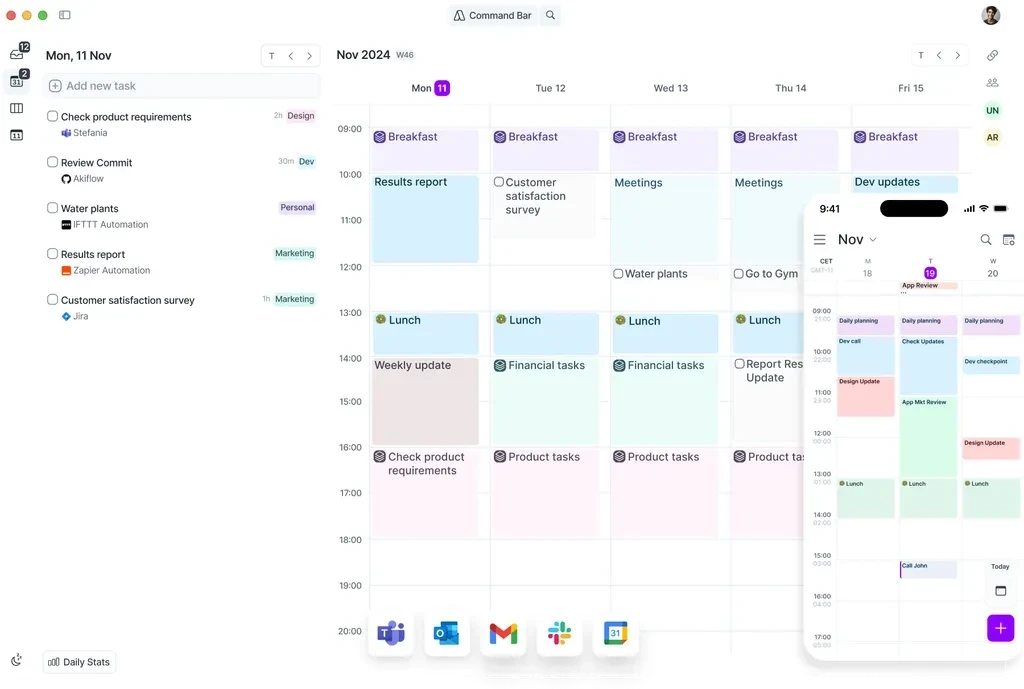
Best for: Power users managing tasks from many platforms who want a dedicated, fast time blocking workflow without delegating decisions to AI.
Akiflow is built around time blocking as the primary workflow. Tasks captured from Slack, Notion, Gmail, Jira, Asana, Linear, and other platforms arrive in a unified inbox, and the primary action is scheduling them into calendar blocks. The interface is structured around this workflow: the calendar and the task inbox share a view, and dragging tasks into slots is the core interaction. Time blocking feels integrated rather than incidental because it is the product's reason for existing.
The command bar is one of Akiflow's genuine differentiators on Mac — quick task capture and scheduling without leaving your current context. Rituals (morning and evening planning prompts) build the time blocking habit by making the daily planning session a structured part of the app rather than something you have to remember to do.
Mac experience: Proper native Mac app — fast to launch, keyboard-first, integrates with macOS notifications. Not a web wrapper. Feels at home on macOS.
Pros:
Task consolidation from 30+ sources into one unified inbox — the broadest integration depth in this category
Command bar for fast task capture and scheduling without leaving your workflow
Time slots — batch multiple small tasks into a single named block (e.g. "admin" or "client work")
Morning and evening ritual prompts that build the daily planning habit
Time tracking shows actual vs planned time per task, improving estimation over time
Available on Mac, Windows, and mobile (beta)
Cons:
No AI scheduling suggestions — every decision is manual
No AI analysis of patterns across weeks — the time tracking data exists but isn't synthesised into insight
$34/month on the monthly plan; $19/month annually — meaningful ongoing cost
Mobile app still in beta; iOS experience is behind the desktop
No free tier — 7-day trial only
Pricing: $19/month billed annually ($34/month monthly). 7-day trial.
Calendars: Google Calendar, Outlook, iCloud.
Morgen — best for AI-assisted planning across multiple calendars
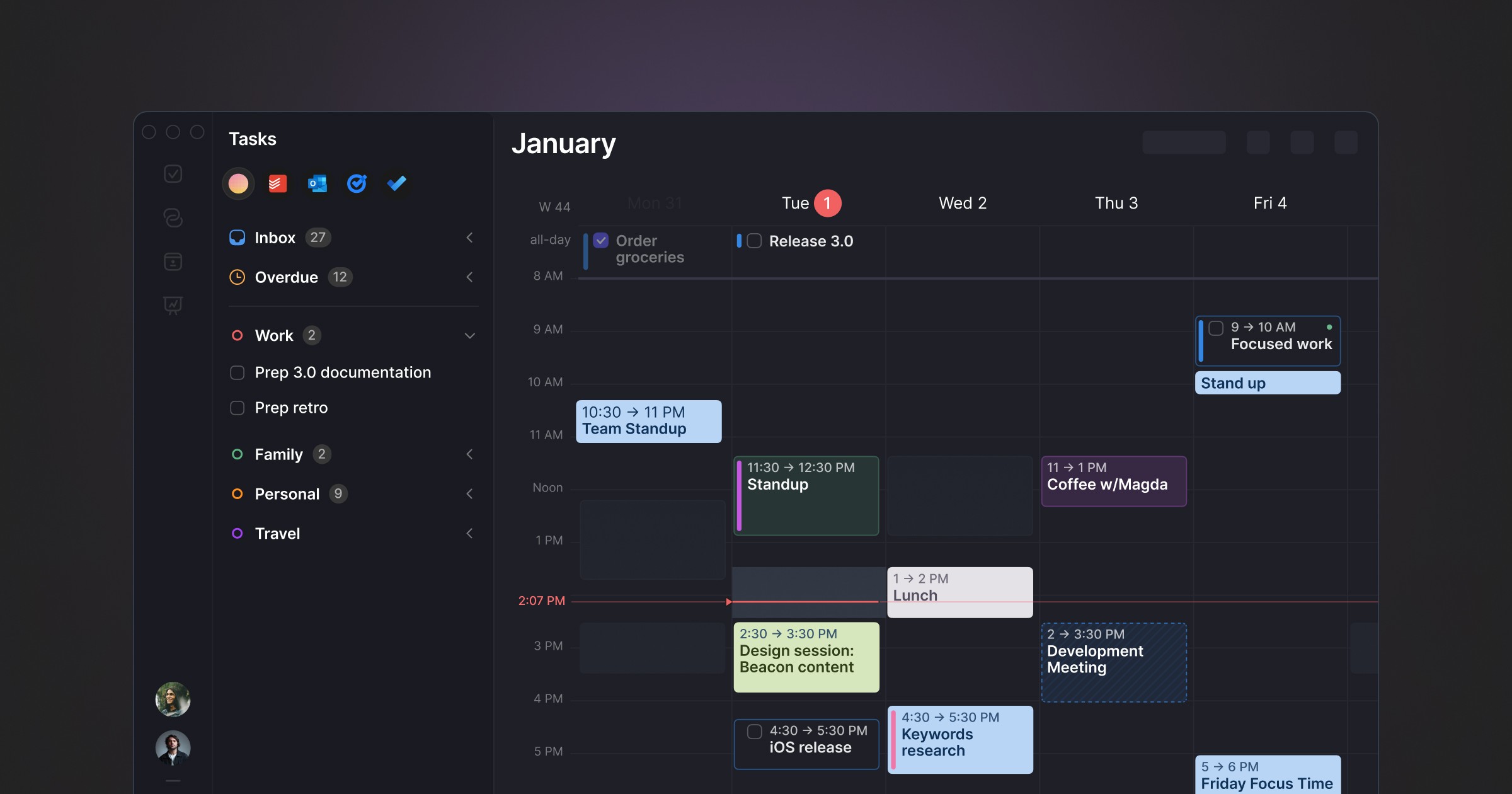
Best for: Users managing multiple calendars and task sources who want AI scheduling suggestions they approve, not automation that runs without them.
Morgen consolidates calendars and task managers into a single view and adds an AI Planner that suggests where to schedule tasks — based on your priorities, time estimates, due dates, and energy level constraints. Critically, you preview and approve suggestions before they become blocks. Nothing moves without your input. This is the meaningful distinction from Motion: the AI assists rather than automates.
Frames are Morgen's standout time blocking feature — recurring calendar templates that define your ideal week structure. You set a frame for "deep work mornings" or "client work afternoons," and the AI Planner schedules tasks within those constraints rather than treating all available time as equivalent. This is a more sophisticated approach to time blocking than simple drag-and-drop, because it encodes your energy management into the scheduling logic.
Mac experience: Electron app — cross-platform consistent but not native macOS. Doesn't have Spotlight integration, Apple Watch support, or the snap of a native app. Functional and well-designed within those constraints.
Pros:
AI Planner that suggests schedules for you to approve — smart assistance without loss of control
Frames for recurring weekly templates — encodes your energy management into scheduling
Multiple sessions per task — spread a large task across multiple blocks throughout the week
Travel and buffer time automation built in
Broad integrations: Notion, ClickUp, Linear, Todoist, Asana, Obsidian, Google, Outlook, iCloud, Fastmail
Available on all platforms including Linux — the most cross-platform option on this list
Cons:
Electron app — not native macOS; heavier on system resources than a native app
No analysis of historical time blocking performance or patterns
No focus execution tools — the app helps you plan blocks but doesn't support working them
No free tier — 14-day trial only
Team features less developed than dedicated project management tools
Pricing: $15/month billed annually ($30/month monthly). 14-day trial.
Calendars: Google Calendar, Outlook, iCloud, Fastmail.
Aftertone — best for time blocking as a complete system

Best for: Mac users who want time blocking as a complete practice — planning, execution support, and AI analysis of whether the blocks are actually working.
Aftertone is a Mac-native calendar and task manager built on behavioural science, and it treats time blocking as a philosophy rather than a feature. Smart Capture converts pasted text or a screenshot into structured tasks instantly. The architecture is built around the full cycle: plan the week in a dedicated week view, execute via the Focus Screen, then receive AI analysis of how the week actually went. Auto-Extend keeps sessions live when you finish early. Pause holds your place.
The Focus Screen is the piece most time blocking apps leave out entirely. When it's time to work on a block, Aftertone narrows to the current task — removing the visual noise of the calendar, other tasks, and everything competing for attention. Roy Baumeister's research on decision fatigue shows this matters more than it sounds: visible alternatives at the moment of starting work measurably affect the quality and persistence of execution. This connects directly to the cognitive cost of task switching — every competing visual in the interface is a micro-decision that drains the same resource. Having blocked the time is the plan. The Focus Screen is what makes executing it easier rather than harder.
The AI weekly and daily reports close the loop that every other app on this list leaves open. They surface patterns across your scheduling history that you can't easily notice in the moment: which time slots consistently produce real output, how your meeting-to-deep-work ratio has trended, whether your time blocking intentions and your actual behaviour are aligned across weeks of data. BJ Fogg's behaviour design research and Phillippa Lally's habit formation work at UCL both show the same mechanism: visibility into your own patterns is what makes changing them possible. The same principle underlies attention residue research — without feedback on where attention is actually going, the pattern stays invisible and unchanged. The weekly and daily reports make those patterns specific rather than vague, weekly rather than annual, and actionable rather than demoralising.
At $30/month, the pricing structure is also fundamentally different from every subscription tool on this list. It costs less than three months of Sunsama and pays for itself against Akiflow within two months.
Mac experience: Genuinely native macOS — not Electron, not a web app. Fast to launch, Spotlight-integrated, offline-capable, respects macOS design conventions throughout. The Mac-native experience is not incidental; it's a deliberate product decision about where serious work happens.
Pros:
AI weekly and daily reports — the only tool in this category that analyses blocking patterns across weeks and surfaces what the data shows
Focus Screen — removes visual load at execution time, making starting easier
Native task management built into the calendar view, not bolted on as an integration
Two-way Google Calendar and Apple Calendar sync
$30/month — 7-day free trial, no card required, data stays yours
Genuinely native macOS — faster, lighter, and better integrated than any Electron alternative
Built on 45 principles from behavioural science and cognitive psychology
Cons:
Mac only — iOS coming; no Windows, no Android, no web access
No auto-scheduling — Aftertone informs and improves your planning decisions rather than making them
No task import from external platforms like Notion, Linear, or Asana
Individual tool — not built for team scheduling or project management
Pricing: $30/month. Smart Zoning moves tasks directly onto the calendar with keyboard shortcuts. Free trial available. No subscription.
Calendars: Google Calendar (two-way sync), Apple Calendar / iCloud.
Sunsama — best for a guided daily planning ritual
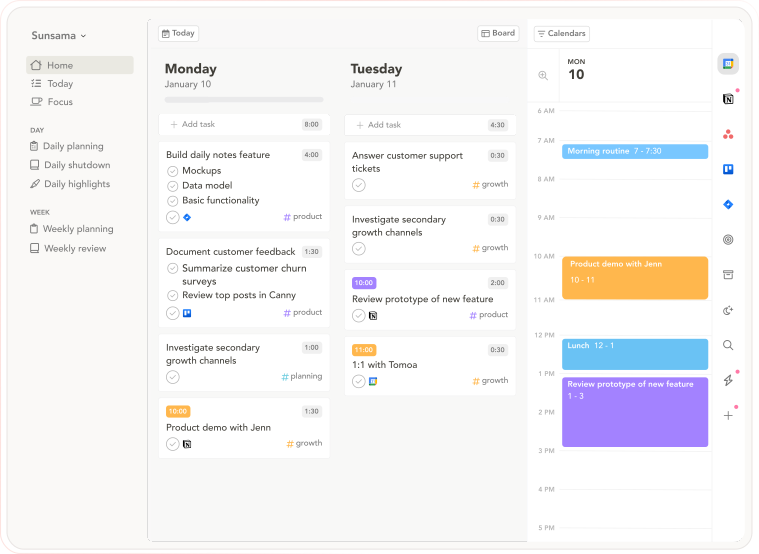
Best for: Users who struggle to time block consistently and want a structured morning ritual that makes planning happen by default rather than on days they remember.
Sunsama makes time blocking habitual by embedding it in a guided daily morning planning session. Each morning, you pull tasks from connected tools, estimate durations, and place them into your calendar. The ritual structure means time blocking happens by default — it's not something you do when you remember, it's something the app walks you through every day. For users whose time blocking practice is inconsistent, the enforced ritual removes the decision about whether to block time today.
The commitment mechanism matters here. Phillippa Lally's habit research shows that cue-routine-reward loops are how behaviours become automatic. Sunsama's morning ritual is a deliberately engineered cue. The daily planning session is the routine. Completing it and seeing a structured day is the reward. This is why Sunsama works for people who've tried time blocking in other apps and couldn't maintain the habit.
Mac experience: Electron app — consistent cross-platform experience but not native macOS. No Apple Watch integration, no Spotlight. Functional and well-designed within the Electron constraints.
Pros:
Guided daily planning ritual that enforces the time blocking habit automatically
Weekly objectives — set goals and link daily tasks to them, creating meaning above the task level
Daily Shutdown feature — structured end-of-day review and reflection
Integrations with Asana, Trello, Notion, ClickUp, Todoist, Gmail, Slack
Cross-platform: macOS, Windows, web, iOS, Android
14-day free trial, no credit card required
Cons:
No AI scheduling suggestions — everything is manual
The daily ritual takes 15–20 minutes; users who want speed find it slow
No AI analysis of time blocking patterns across weeks
No focus execution tools — plans the blocks but doesn't help you work them
$20/month annually is the highest recurring cost on this list for an individual tool
Electron — not native macOS
Pricing: $20/month billed annually ($26/month monthly). 14-day free trial, no credit card required.
Calendars: Google Calendar, Outlook.
Reclaim AI — best free option for automated focus blocks
Best for: Google Calendar users who want focus blocks and habits automatically scheduled without any manual time blocking — and want it free.
Reclaim AI takes the opposite philosophical approach from every other app on this list: instead of you building the time blocks, Reclaim builds them for you. You define your tasks, habits, and focus time preferences; Reclaim finds available slots in your Google Calendar and schedules them automatically. When meetings move or new events appear, focus blocks are rescheduled around them. The ideal is that your protected time is always current without you having to maintain it.
The important context for this Mac-specific list: Reclaim is a web app and Google Calendar layer, not a Mac app. There's no native macOS application, no Spotlight integration, no offline access. If you're looking specifically for a Mac calendar app, Reclaim isn't that — it's a web service that enhances your Google Calendar. For Mac users who want automation rather than intentional planning and who live primarily in Google Calendar, it's the best free option in this category.
Mac experience: Web app only — no native Mac app, no Apple ecosystem integration. Works in any browser. Not a Mac calendar app in the conventional sense.
Pros:
Free tier — full access to core auto-scheduling features at no cost
Automatically schedules focus blocks, habits, and flexible tasks around existing meetings
Smart rescheduling — when meetings move, focus blocks adjust automatically
Slack status sync — automatic DND during focus blocks
Integrates with Todoist, Asana, Linear, ClickUp, Jira, Google Tasks
Cons:
Google Calendar only — no Outlook, no iCloud, no Apple Calendar
No native Mac app — web only
No focus execution tools
No analysis of time blocking effectiveness over time
Automation without control — blocks are scheduled for you, which some users find disorienting
Pricing: Free forever plan. Paid from $8/month (annual).
Calendars: Google Calendar only.
Motion — the benchmark, and why most time blockers leave it
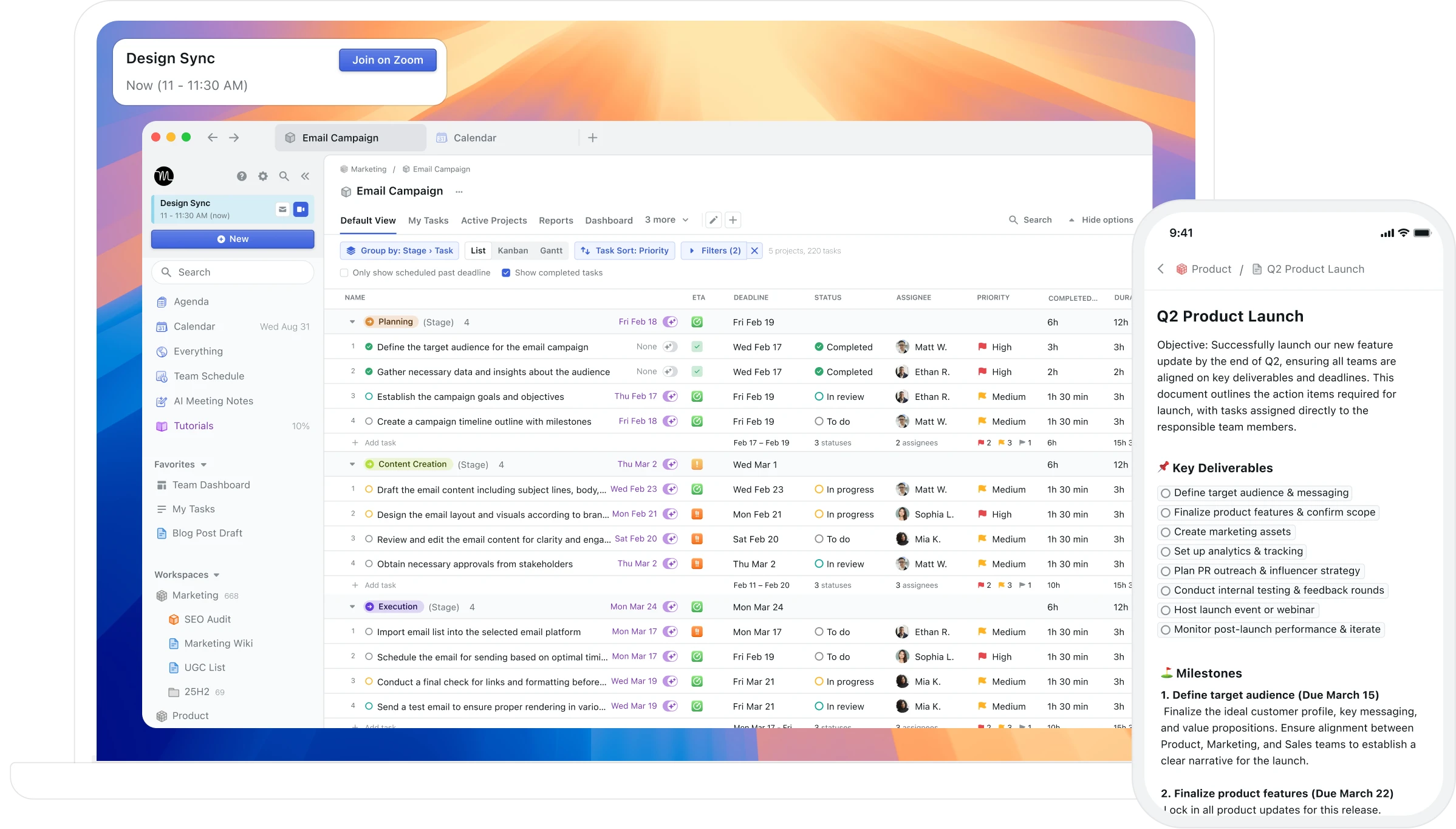
Best for: Users whose core problem is scheduling paralysis — who genuinely cannot convert a task list into a daily plan without significant friction — and who are comfortable ceding control of their schedule to AI.
Motion is the tool most people encounter first when they start researching time blocking software, and for good reason: its AI auto-scheduling is the most aggressive time-blocking automation available. You add tasks with deadlines and priorities; Motion schedules them into your calendar in real time, adjusting automatically when meetings appear, tasks run long, or priorities change. The pitch is that you never have to think about when to do things again.
For the specific user Motion is built for — someone paralysed by the planning step, who just needs the day structured — it genuinely works. The reviews from those users are sincere.
For everyone else, the core problem is the same as with any fully automated system: the schedule is technically complete but doesn't feel like yours. BJ Fogg's behaviour design research shows that plans we form ourselves produce dramatically higher follow-through than plans generated externally. Motion generates the plan externally. The reshuffling happens without your input. And there's a second, less-discussed limitation: Motion builds schedules but has no mechanism for telling you whether those schedules are working. After months of Motion-managed days, you know what was scheduled. You don't know what the scheduling patterns reveal about your productive capacity, peak hours, or whether the practice is improving your output.
Mac experience: Web app and browser extension — no native macOS app. No Spotlight, no Apple Watch, no Siri. Works on Mac via browser.
Pros:
Most aggressive AI auto-scheduling available — tasks are fully scheduled for you
Real-time rescheduling when meetings move or tasks run long
Project management features built in
Team scheduling and shared calendars
Cross-platform including iOS and Android
Cons:
No native Mac app — web and browser extension only
$34/month with no free tier — the most expensive individual option on this list
AI reshuffles your entire schedule unpredictably when anything changes
No feedback on whether the schedule it builds is working over time
Data lock-in — no clean export if you decide to leave
Interface is dense and overwhelming for users who wanted simplicity
Pricing: $34/month ($19/month annually). No free tier. Credit card required for trial.
Calendars: Google Calendar, Outlook, iCloud.
Routine — best free Mac app for calendar-first planning
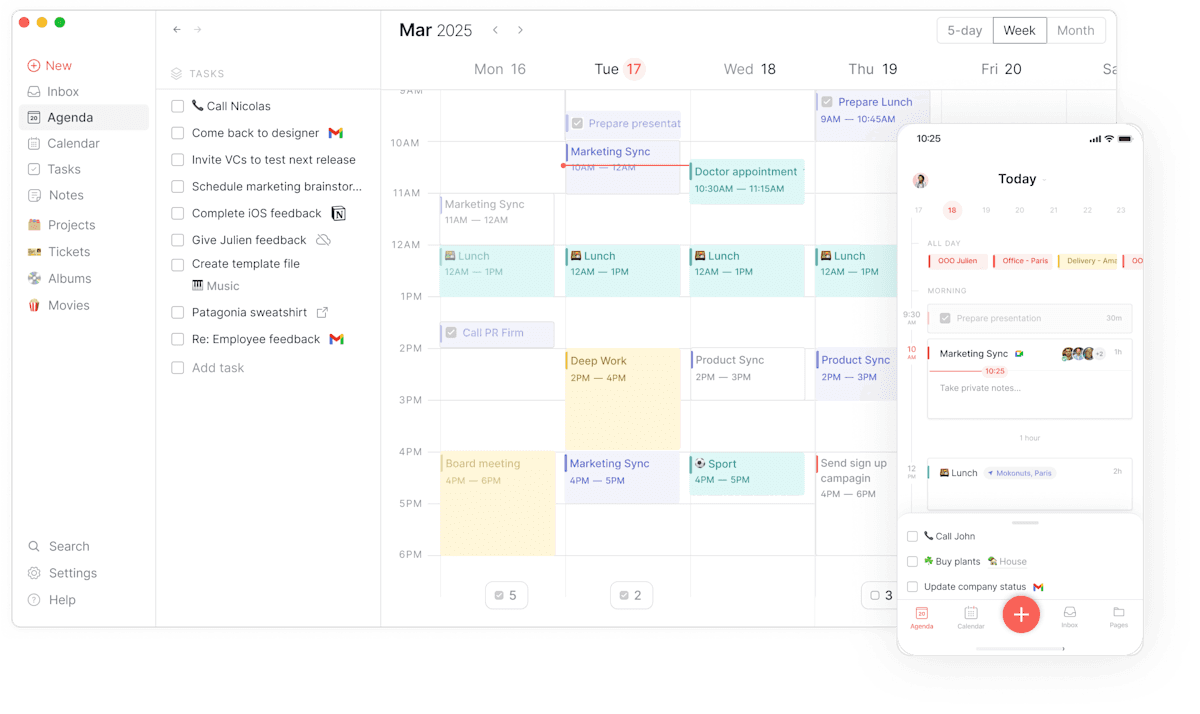
Best for: Users who want a clean, fast, native Mac calendar experience with basic time blocking built in — and want to start free.
Routine is a calendar-centred planner with a proper native Mac app and a free tier that's genuinely functional. It's deliberately simpler than the tools above — no AI scheduling engine, no deep integrations, no complex setup — which makes it the fastest tool on this list to get useful. The daily reset feature encourages regular planning and reflection, building consistency in the time blocking habit without the guided ritual overhead of Sunsama.
For Mac users who are new to time blocking and want to try the practice before committing to a paid tool, Routine is the honest recommendation: native app, free to start, clean enough to not get in the way.
Mac experience: Native Mac app — proper macOS design, keyboard shortcuts, system integration. Also available on Windows and iOS.
Pros:
Free tier — genuinely functional without paying
Native Mac app — fast, lightweight, proper macOS design
Calendar and tasks in one clean view
Daily reset feature encourages the planning habit
Keyboard-first design — minimal mouse required
Cons:
No AI scheduling or planning suggestions
No analysis of time blocking effectiveness
Fewer integrations than Akiflow or Morgen
Not suitable for complex project management or multi-source task consolidation
Pricing: Free tier. Paid plan $12/month.
Calendars: Google Calendar, Outlook, iCloud.
Sorted 3 — best for within-day capacity management
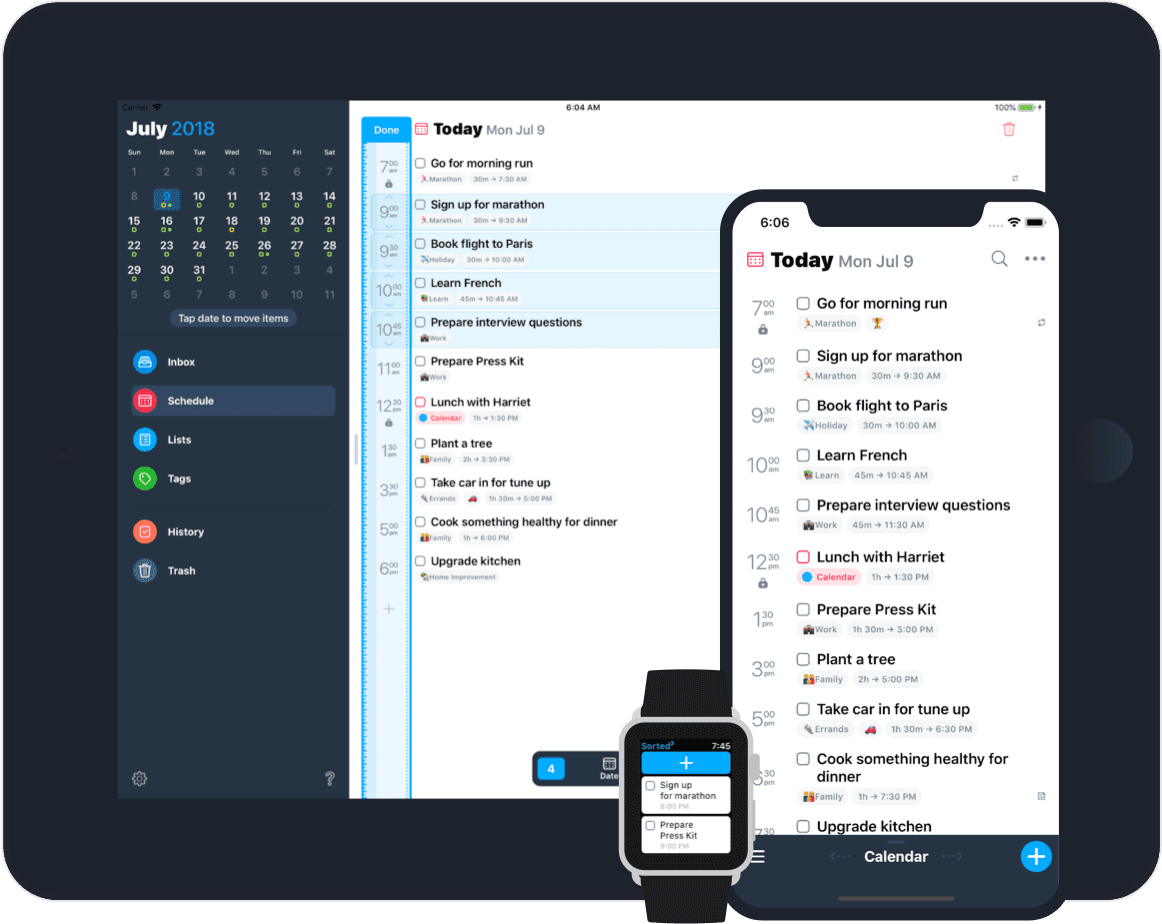
Best for: Time blockers who regularly over-schedule and want honest capacity feedback during daily planning.
Sorted 3 takes an auto-scheduling approach to time blocking: tasks have duration estimates and the app fills them into available slots on the timeline automatically. The running total shows exactly how much time is committed and whether the day is over-scheduled before it starts. For users who optimistically block more than the day can hold, this capacity check during the planning phase is more honest than any tool that accepts any volume of work without feedback.
Mac experience: iOS-first with a Mac companion app. The Mac experience is functional but secondary — this is primarily a mobile tool. If Mac is your primary work device, this isn't the strongest choice.
Pros:
Auto-scheduling fills tasks into available slots automatically based on duration estimates
Running time total gives honest capacity feedback during planning
One-time purchase — no subscription
Clean, focused interface built around the timeline
Cons:
iOS-first — the Mac app is a companion, not a full desktop experience
No cross-week AI analysis of blocking patterns
No task consolidation from external platforms
No focus execution tools
Limited integration depth compared to Akiflow or Morgen
Pricing: One-time purchase (iOS/Mac pricing varies by App Store tier).
Calendars: Apple Calendar / iCloud.
FlowSavvy — best for automatic individual task scheduling
Best for: Mac users who want to input tasks with deadlines and let the AI schedule them automatically, without manually dragging anything onto a calendar.
FlowSavvy is an automatic time blocker built for individuals: you add tasks to a to-do list with durations and deadlines, and FlowSavvy fills them into your calendar automatically. When you miss a task or a meeting appears, it reschedules everything around the new constraints. The focus is individual use — there are no team features, no task assignees, no shared projects — but for a single person who wants their task list to become a calendar plan without manual dragging, FlowSavvy does this more cleanly than most alternatives.
This is the closest individual equivalent to what Clockwise did for meeting defragmentation — except applied to tasks. At $14/month (or free tier), it's also among the most affordable options on this list.
Pros:
Automatic scheduling — no manual dragging required
Auto-reschedules when tasks are missed or meetings appear
Two-way sync with Google Calendar, Outlook, and iCloud
Strong mobile apps (iOS and Android) with full feature parity
Free tier available; most affordable paid option at $14/month
Cons:
No native Mac app — web and mobile only
No task management integrations (tasks must be added directly)
No execution support or AI analysis of patterns across weeks
Individual only — no team or collaboration features
Pricing: Free tier available. $14/month or $120/year.
Calendars: Google Calendar, Outlook, iCloud.
Why choose it: You want time blocking to happen automatically without manual planning sessions. You primarily use iOS or Android and want full feature parity on mobile.
Google Calendar — the free baseline already on your Mac
Best for: Users who want to start time blocking immediately at zero cost, using a tool they already have, before deciding whether to upgrade.
Google Calendar is not a time blocking app. It's a calendar that supports manual time blocking through standard event creation. You create an event called "Deep Work," colour it differently from meetings, block ninety minutes, and that's your time block. Google Calendar accepts any amount of work without feedback, has no task integration that bridges your to-do list into the calendar, and tells you nothing about whether the blocks you create were actually executed.
What it is: free, familiar, already synced with almost everything, and a completely valid starting point. The limitation isn't Google Calendar — it's using any standard calendar as a time blocking system without the feedback loop that makes the practice durable. Most people who start time blocking in Google Calendar and stick with it eventually move to a dedicated tool. Google Calendar is where you learn what you need before choosing which tool to move to.
As of April 2026, Google Calendar added basic task duration support for time blocking tasks alongside events — though repeating tasks still don't support duration, making it incomplete for systematic time blocking.
Pros:
Free — zero cost to start
Already familiar to most users
Integrates with virtually every other tool
Native Focus Time event type available for Google Workspace users
Cons:
No task-to-calendar integration — requires separate task list
No execution support or feedback on whether blocks were completed
No Mac app — web-based only
Time blocks compete with meetings for visual space with no distinction in treatment
Pricing: Free. Google Workspace plans from $6/month.
Why use it: You want to try time blocking before committing to a paid tool. Use it for two weeks, learn what frustrates you about the experience, then choose the right dedicated app based on what was missing.
The practice versus the system
Time blocking practiced in a standard calendar is a practice. You do it when you remember, it helps when you do it, and you have no way to know whether it's improving over time. Time blocking practiced in an app built for it becomes a system. The planning is structured. The execution is supported. The feedback loop tells you whether the practice is working and where to adjust.
The failure rate for time blocking as a practice is high. The success rate for time blocking as a system is significantly better, and the research on implementation intentions by Peter Gollwitzer at New York University shows why: the specificity of "I will do X at time Y in context Z" produces dramatically higher follow-through than "I will do X this week." Apps that make this specificity easy and then report on whether the specificity translated into execution are the ones where time blocking actually sticks.
The tools above sit across a spectrum of how much of the system they provide. Sorted 3 and Routine handle the planning layer. Akiflow, Morgen, and Sunsama handle planning and habit formation. Aftertone handles planning, execution, and feedback — the full loop. For Mac users who've tried time blocking and found it didn't last, the question isn't whether the technique works. It's whether the tool supported the system rather than just accepting the plan.
Frequently asked questions
What is the best Mac app for time blocking?
Aftertone is the strongest Mac-native time blocking app — it treats time blocking as a complete system with built-in task management, a Focus Screen for execution, and AI weekly and daily reports that analyse whether your blocks are actually working. Akiflow is the best option if you want to consolidate tasks from many tools into a single time blocking workflow. Morgen is best if you want AI-assisted scheduling suggestions across multiple calendars.
What is time blocking and why does it matter?
Time blocking is the practice of assigning every hour a specific job before the day starts — treating your calendar as a contract with yourself rather than a wish list. Cal Newport, who popularised the technique, describes it as the core mechanism for doing deep work. The common failure mode isn't lack of commitment — it's lack of feedback. Without visibility into whether blocks are being executed and which patterns produce real output, time blocking becomes planning theatre.
Is there a free time blocking app for Mac?
Yes — Routine has a functional free tier with a proper native Mac app and is the best starting point for Mac users who want to try time blocking before committing to a paid tool. Reclaim AI has a stronger free tier for auto-scheduled focus blocks, but it's a web app rather than a native Mac experience. Google Calendar is free and supports manual time blocking through event creation, though it provides no task management or feedback on execution.
What's the difference between a time blocking app and a calendar app?
A standard calendar app records what you've committed to. A time blocking app treats scheduling as the primary workflow — tasks slot into blocks by default, the week view is designed around protecting time, and ideally the app gives you feedback on whether the blocks were executed. The practical difference is that time blocking in a standard calendar requires maintaining a separate task list and manually bridging two systems. Apps built for time blocking close that gap natively.
Why does time blocking fail for most people?
The most common failure mode is the absence of a feedback loop. When time blocking is done in a standard calendar, you create the blocks, the week unfolds, and you have no signal about whether the blocks were executed or which patterns produce real output. Without that feedback, the practice gradually stops because there's no evidence it's working. Apps specifically built for time blocking address this by closing the loop between planning, execution, and insight.
What is the difference between automatic and manual time blocking?
Automatic time blocking tools (FlowSavvy, Motion, Reclaim) take your task list and schedule the blocks for you — the AI decides when each task runs and reschedules when things change. Manual time blocking tools (Akiflow, Morgen, Sunsama) give you the structure to place tasks into time slots yourself, usually with drag-and-drop and AI suggestions, but the final decisions remain yours. Automatic is faster and lower friction; manual gives you more control over exactly when important work happens. Most experienced time blockers prefer manual or hybrid approaches because the act of placing a block is itself a prioritisation decision.
Can I time block in Google Calendar on Mac?
Yes — you can create events called "Deep Work" or "Focus Block" in Google Calendar and use them as time blocks. Google Calendar added basic task duration support in 2025, though repeating tasks still lack full duration support as of early 2026. The limitation isn't that Google Calendar can't hold time blocks; it's that it provides no help with the practice — no task-to-calendar workflow, no execution support during the block, and no feedback on whether blocks were used productively. It's the right starting point and a poor permanent solution for serious time blockers.
