Best Mac Calendar Apps in 2026: 11 Apps Tested and Ranked
The 11 best Mac calendar apps in 2026: from Apple Calendar and Fantastical to AI schedulers like Motion and Aftertone. Compared for native performance, AI.
Written By The Aftertone Team

Best Mac Calendar Apps in 2026
The best Mac calendar app in 2026 depends on what you need beyond Apple Calendar: Fantastical for design and fast event entry, BusyCal for one-time purchase value, Aftertone for AI scheduling analysis and focus protection, and Motion for full auto-scheduling of tasks and meetings.
Quick answer: The best Mac calendar app depends on what you need beyond Apple Calendar's basics. Here are the top picks:
Apple Calendar — best free option already on your Mac (built-in, free)
Google Calendar — best free cross-platform option (free, web-based)
Notion Calendar — best free third-party calendar, especially for Notion users (free)
BusyCal — best one-time purchase with deep Mac-native features (~$50 one-time)
Fantastical — best natural language event creation and Apple ecosystem integration ($57/yr)
Morgen — best for cross-platform and multi-account with AI suggestions ($15/mo)
Motion — best for full AI auto-scheduling of tasks and meetings ($19/mo+)
Aftertone — best for focus protection and AI analysis of scheduling patterns (Mac, $30/mo)
Akiflow — best for task consolidation from 30+ tools with manual time blocking ($19/mo)
Sunsama — best for intentional guided daily planning ($20/mo)
Structured — best visual timeline for simple day planning (free / $64.99 lifetime)
Mac users have more calendar app choices than any other platform — but most of them solve the same problem slightly differently: showing your events in a prettier view than Apple Calendar. The real question isn't which calendar looks best. It's whether your calendar app helps you plan, execute, and improve your work — or just displays what's already scheduled.
Here are the eight best Mac calendar apps in 2026, compared on what actually matters.
The scale of the problem is worth naming: knowledge workers switch between apps and websites an average of 1,200 times per day, according to RescueTime research. A calendar app is the one tool that could impose structure on that chaos — but only if it's built to do more than display events. macOS accounts for roughly 16% of desktop computers worldwide (StatCounter, 2025), meaning Mac users are a specific and high-intent audience with real platform expectations: native design, keyboard shortcuts, deep Apple ecosystem integration, and apps that respect the operating system rather than fighting it.
What to look for in a Mac calendar app
After testing dozens of Mac calendar apps, the meaningful differences come down to five things:
Native vs Electron. Mac-native apps (Aftertone, Fantastical, BusyCal) are faster, support system features (Spotlight, widgets, Shortcuts), and feel right on macOS. Electron-wrapped apps (Morgen) work but feel like visitors.
Calendar vs system. Most apps show your calendar. A few (Aftertone, Sunsama) build a productivity system around it — with task management, focus protection, and AI analysis.
AI depth. Ranges from none (Apple Calendar, Fantastical) to scheduling suggestions (Morgen) to behavioral analysis (Aftertone).
Pricing model. Subscription, one-time, or free — the long-term cost differences are significant.
Calendar sync. Google Calendar, Outlook, iCloud, Exchange — which accounts you need connected.
How we evaluated these apps
Each app was tested on macOS for native performance, calendar sync reliability, task management depth, AI features, and value for money. We ranked by overall utility for Mac-first professionals, not just design polish.
At a glance: all alternatives compared
App | Price | AI scheduling | Focus tools | Free tier | Platform | Best for |
|---|---|---|---|---|---|---|
Apple Calendar | Free | None | None | Yes (built-in) | Mac, iOS, Watch | Mac users who want free, reliable scheduling across all Apple devices |
Google Calendar | Free | None | Focus Time (Workspace) | Yes | Web, all platforms | Cross-platform teams and Google Workspace users who need universal access |
Motion | $19/mo (annual) | Full auto-scheduling | None | No | All platforms | Users who want AI to schedule and reschedule everything automatically |
Aftertone | $30/month | Silent/advisory | Focus Screen | Free trial | Mac only | Mac users who want AI analysis of scheduling patterns and a built-in Focus Screen |
Fantastical | Free (limited) / $4.99/mo or $39.99/yr | None | None | No | Apple only | Apple ecosystem users who add 10+ events daily and want the fastest event entry |
Morgen | $15/month billed annually | Suggestions | None | No | All platforms | Cross-platform users managing multiple calendars who want AI suggestions they approve |
BusyCal | Available via Mac App Store (one-time) or subscription | None | None | No | All platforms | Mac users who want deep native features with a one-time purchase |
Notion Calendar | Free | None | None | Yes | All platforms | Notion users who want free, well-designed calendar integration |
Akiflow | $19/month billed annually ($34/month monthly) | None | None | No | All platforms | Users consolidating tasks from 30+ tools who want manual time blocking |
Sunsama | $20/month billed annually ($26/month monthly) | None | None | No | All platforms | Users who want a guided daily planning ritual with mindful time allocation |
Structured | Free tier | None | None | No | All platforms | Users who want a visual timeline-based planner for simple day structure |
1. Apple Calendar — best free Mac calendar, already installed
Best for: Mac users who need a reliable, free calendar that works across all Apple devices and handles the basics well — before deciding whether to upgrade to a third-party app.
Apple Calendar ships on every Mac, iPhone, iPad, and Apple Watch. It syncs via iCloud, supports Google Calendar, Outlook, and Exchange accounts, integrates with Siri, and costs nothing. For a significant portion of Mac users, this is exactly what they need and the right answer is to stop here. It handles recurring events, shared calendars, invitations, and multiple accounts without any additional cost or learning curve.
Pros:
Free — already installed on every Mac
Best Apple ecosystem integration: Siri, Apple Watch, Focus modes, Spotlight, widgets
Handles iCloud, Google Calendar, Outlook, Exchange, and CalDAV
Reliable, well-maintained, and simple
Cons:
No natural language event creation beyond basic parsing
Limited views — no time blocking, no multi-timezone column view
No task management, no AI scheduling, no productivity analysis
Pricing: Free — built into macOS.
Calendars: iCloud, Google Calendar, Outlook, Exchange, CalDAV.
2. Google Calendar — best free cross-platform option
Best for: Mac users on Google Workspace, or anyone needing free calendar access on every platform — Mac, Windows, Android, iOS — from a single account.
There is no Google Calendar Mac app — it's web-based only. But it syncs with every Mac calendar app on this list, making it the universal backend for most knowledge workers regardless of front-end. For users who also work on Windows, use Android, or need reliable access from any browser, Google Calendar's reach is unmatched at zero cost.
Google Workspace users get Focus Time events — a native event type that auto-declines conflicting meetings and mutes Chat notifications during protected blocks. A free, immediate time-blocking mechanism for teams already on Workspace.
Pros:
Free for personal accounts; included with Google Workspace
Available on every platform — the universal cross-platform standard
Focus Time for Workspace users
Integrates with virtually every calendar app and productivity tool
Cons:
No native Mac app — web only
No task-to-calendar bridge, no AI scheduling, no productivity analysis
Pricing: Free. Google Workspace from $6/month.
Calendars: Google Calendar (native); syncs with iCloud, Outlook via third-party apps.
3. Motion — best for full AI auto-scheduling of tasks and meetings
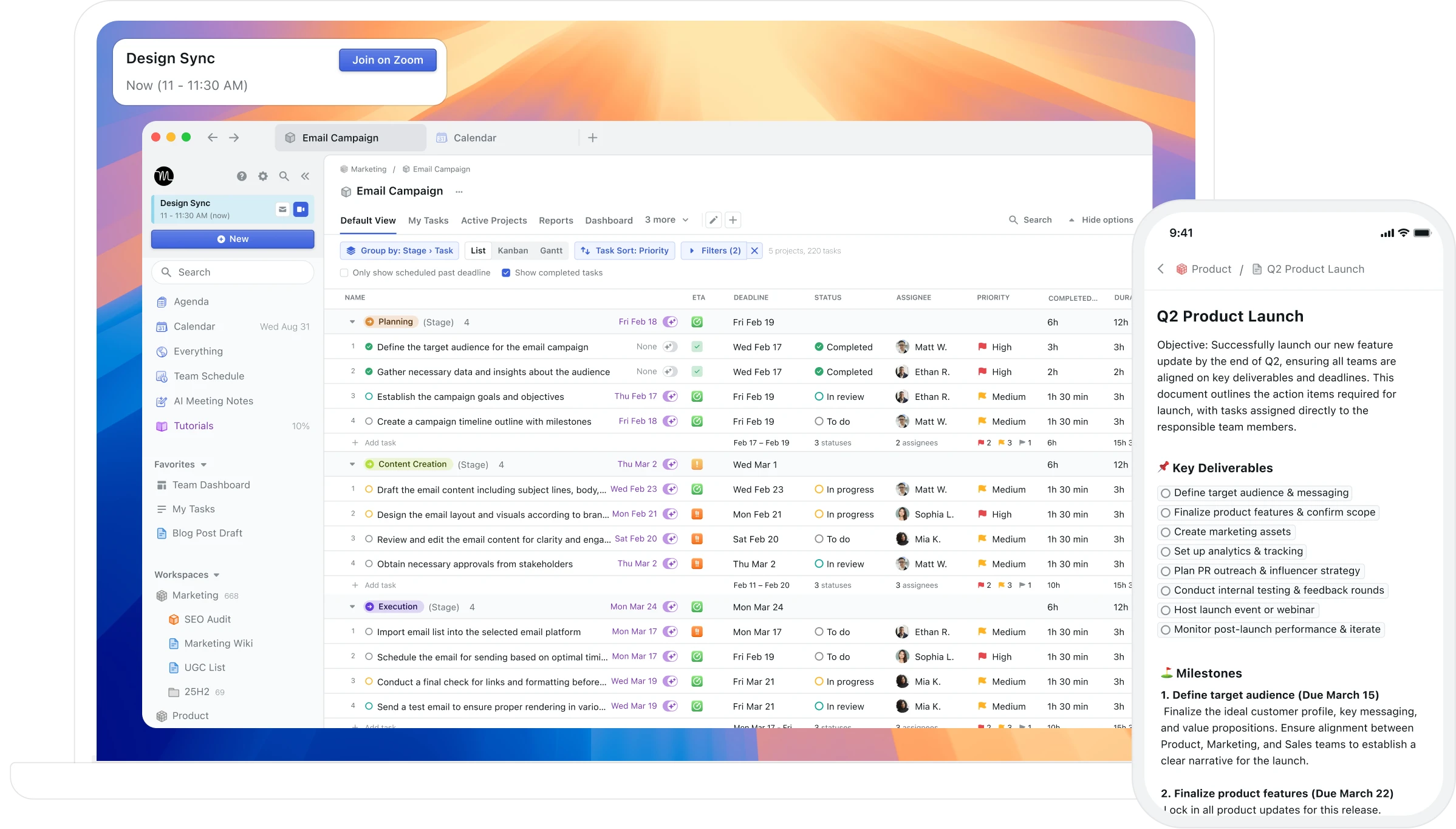
Best for: Mac users with heavy, volatile task loads who want AI to schedule and reschedule everything automatically, without manually deciding when each task runs.
Motion is the most aggressive auto-scheduler on this list. Add tasks with deadlines and priorities; Motion places them in the calendar and reschedules when meetings appear or tasks change. The cognitive overhead of deciding when each task runs is transferred to the AI entirely. The built-in project and task management layer means Motion can replace both your calendar and task manager through automation rather than manual control.
Pros:
Full AI auto-scheduling — tasks and meetings placed and rescheduled automatically
Built-in project and task management
Available on Mac, Windows, iOS, and Android
Team scheduling features
Cons:
AI makes scheduling decisions you may not endorse — less control than Morgen or Aftertone
Steep setup — needs project and priority configuration before automation works well
No single-task focus mode during sessions
Pricing: $19/month individually (annual). Team plans from $12/member/month.
Calendars: Google Calendar, Outlook.
4. Aftertone — best for Mac users who want AI feedback, Focus Screen, and time blocking as a complete system

Best for: Mac users who want to understand not just what's on their calendar, but whether the way they schedule is actually producing results — the only app in this list with AI analysis of scheduling patterns over time, built on 45 principles from behavioural science and cognitive psychology
Aftertone is a Mac-native calendar and task manager built on behavioural science. Smart Capture converts pasted text or a screenshot into structured tasks instantly. The philosophical difference from most alternatives is explicit: instead of automating your schedule, Aftertone analyses what actually happens when you execute it. The AI weekly and daily reports surface patterns across your scheduling history — which time slots produce real output, how your meeting-to-deep-work ratio trends, whether your calendar structure this week resembles your most or least productive periods. The Focus Screen supports execution: when it's time to work, everything except the current task disappears. Auto-Extend keeps sessions live when you finish early. Pause holds your place.
Pros:
AI weekly and daily reports — the only tool in this category that analyses your scheduling patterns over time
Focus Screen — narrows to the current task at execution time, removing visual load
Native task management built into the calendar view, not bolted on
Two-way Google Calendar sync
$30/month — 7-day free trial, no card required
Built on 45 principles from behavioural science and cognitive psychology
Cons:
Mac only — iOS coming; no Windows or Android currently
No auto-scheduling — Aftertone informs and improves your planning rather than making decisions for you
Individual tool only — not built for teams
Google Calendar sync only (no Outlook, no iCloud events)
Pricing: $30/month. 7-day free trial, no card required.
Calendars: Google Calendar (two-way sync).
5. Fantastical — best for Apple-native design and fast natural language event creation
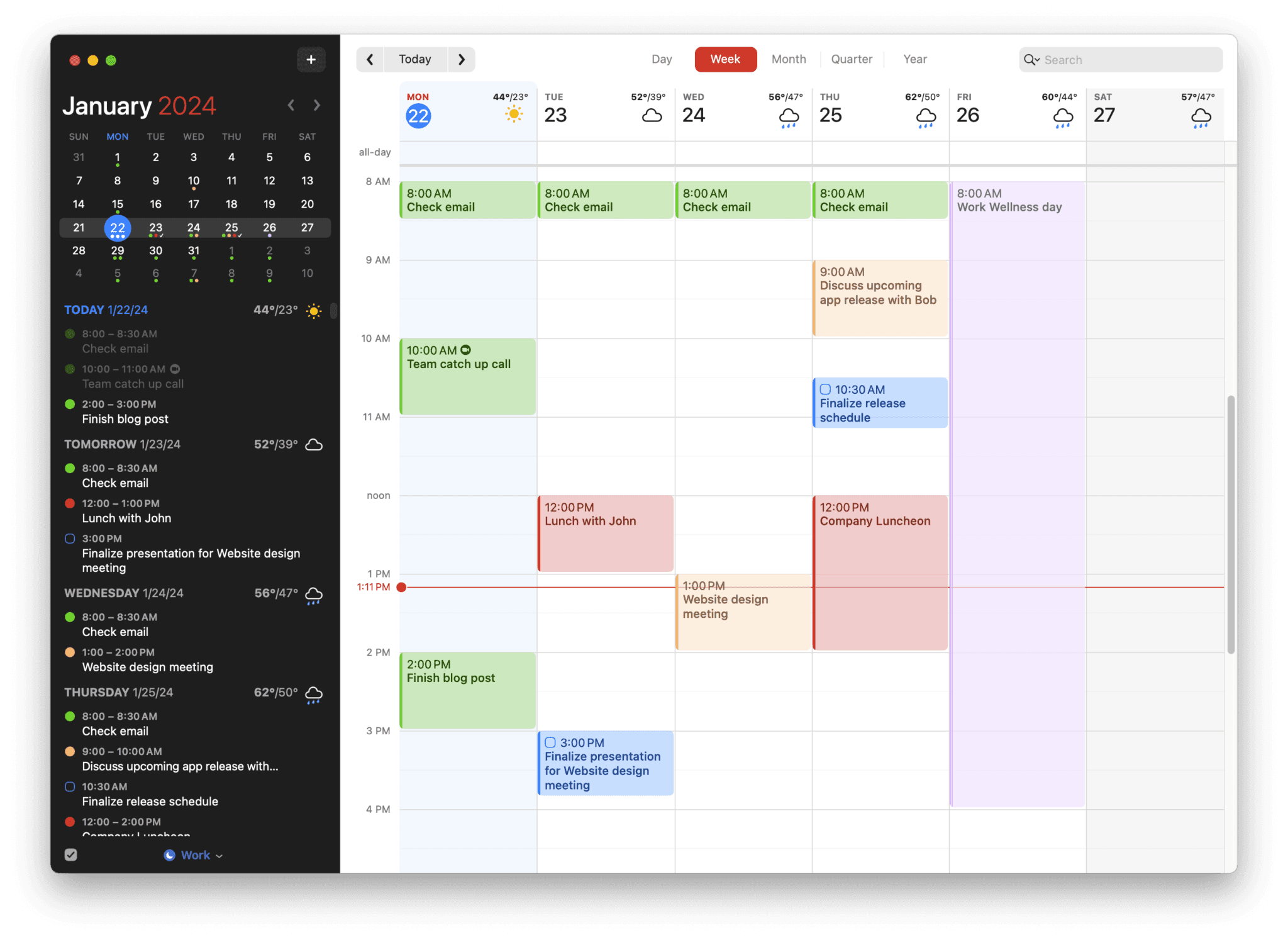
Best for: Users who want the best-designed native calendar on Apple platforms with fast natural language event creation
Fantastical is the premium calendar app for Apple users. Natural language event creation ("Meeting with Sarah tomorrow at 2pm for 30 minutes") is the fastest way to add events on any platform. Calendar sets let you group calendars by context (work, personal, side project) and switch between them instantly. The design is polished, the Apple Watch app is excellent, and the ecosystem integration is deep.
Pros:
Natural language event creation — fastest event entry available
Calendar sets — group and switch calendar views by context
Mac-native with Apple Watch, iOS, iPad, and widget support
Weather integration in calendar views
Scheduling proposals for finding meeting times
Cons:
$57/year subscription — no lifetime option
No AI scheduling or planning assistance
No task management — relies on Apple Reminders integration
No productivity analysis or weekly and daily reports
Apple ecosystem only — no Windows or Android
Pricing: Free basic (limited views). Premium: $4.99/mo or $39.99/yr. Family: $7.99/mo.
Calendars: Google Calendar, Outlook, iCloud, Exchange, CalDAV.
6. Morgen — best for cross-platform users who want AI planning suggestions they approve
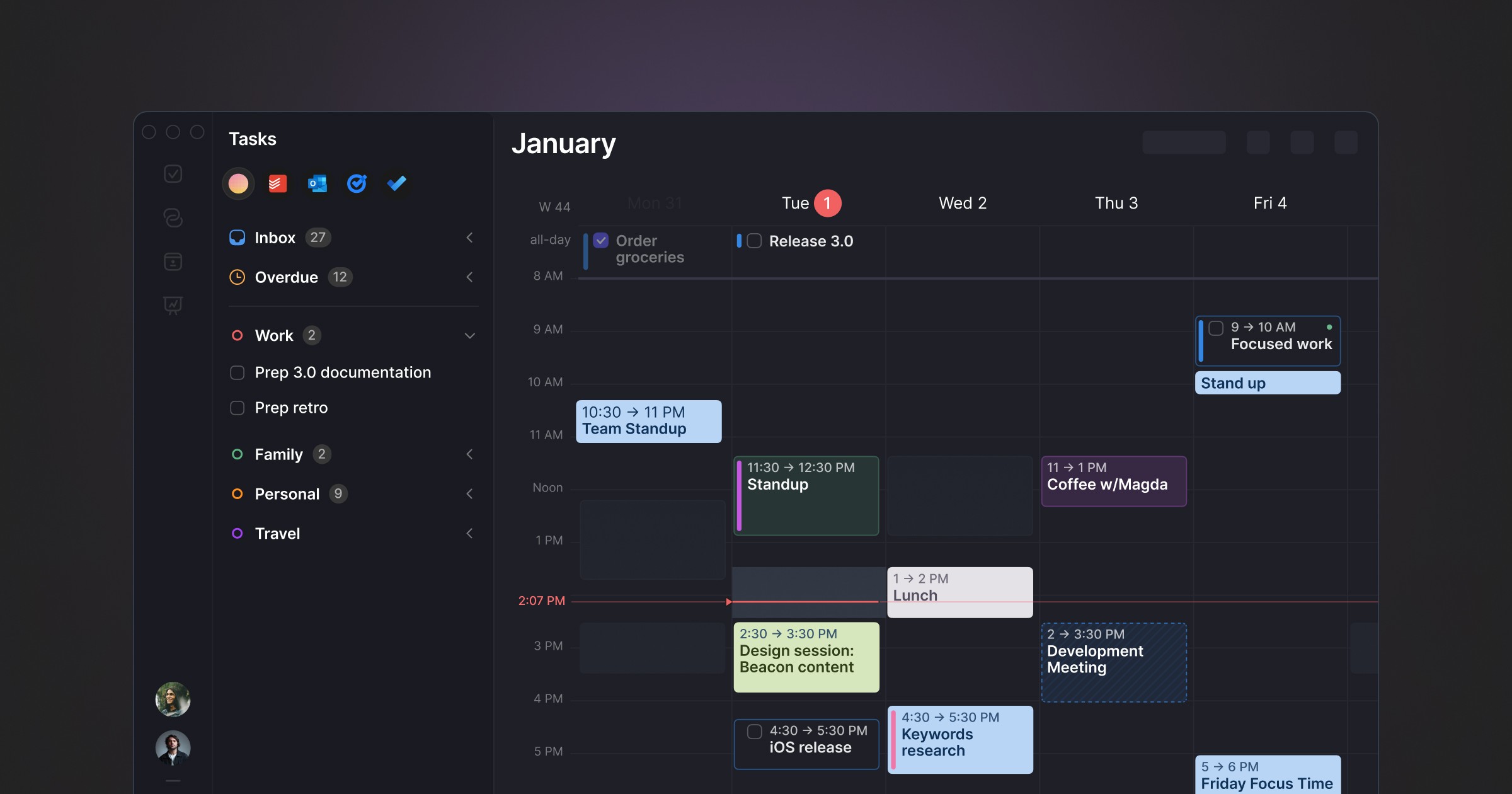
Best for: Cross-platform users who want AI scheduling suggestions they approve, not automation that runs without them
Morgen occupies a distinctive position: AI-powered daily planning without full autopilot. The AI Planner analyses your tasks, priorities, and available time and proposes a day plan — but you review and approve it before it becomes your schedule. Nothing moves without your say. It pulls tasks from Notion, ClickUp, Todoist, Linear, Asana, and others into a unified inbox.
Pros:
AI suggestions with full human approval — no unpredictable reshuffling
Cross-platform: Windows, macOS, Linux, iOS, Android
Strong multi-tool integrations: Notion, Linear, Todoist, ClickUp, Asana, Obsidian
Built-in booking links and meeting scheduler (replaces Calendly)
Buffer and travel time automation
Cons:
No free tier — 14-day trial only
Limited historical feedback on scheduling patterns
Task management is basic — most users pair it with another tool
Electron-based, not Mac-native
Pricing: $15/month billed annually. Team plans from $10/seat/month annually.
Calendars: Google Calendar, Outlook, iCloud, Fastmail.
7. BusyCal — best one-time purchase for Mac power users who want deep customisation
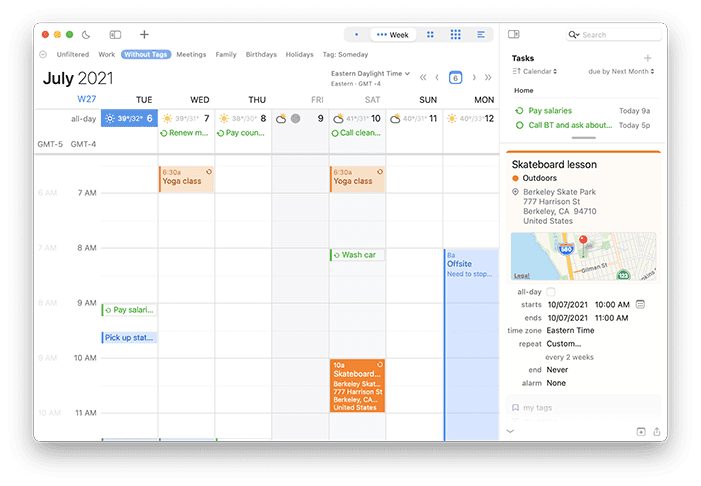
Best for: Mac power users who want deep calendar customisation, weather, travel time, and a menu bar calendar — with a one-time purchase option
BusyCal is a veteran Mac calendar app that targets power users with features Apple Calendar lacks: menu bar access, weather forecast overlays, travel time calculations, customisable day/week/month views, and a built-in task manager. It's one of the few premium Mac calendars available as a one-time purchase.
Pros:
Menu bar calendar for quick access without opening the full app
Weather forecasts integrated into calendar views
Travel time calculations between events
One-time purchase option available via Mac App Store
Natural language event creation
Built-in task manager with alarms and priorities
Cons:
No AI features of any kind
Design feels utilitarian compared to Fantastical
No Focus Screen or productivity analysis
Apple ecosystem only
Pricing: Available via Mac App Store (one-time) or subscription.
Calendars: Google Calendar, Outlook, iCloud, Exchange, CalDAV.
8. Notion Calendar — best free calendar for Notion users
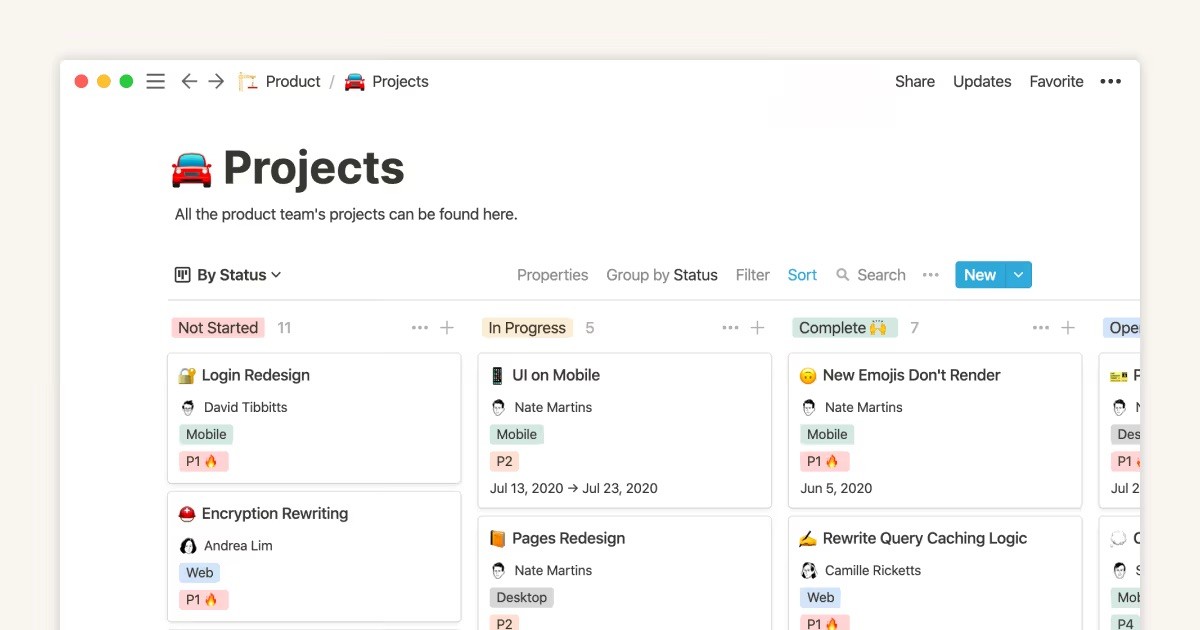
Best for: People who already live in Notion and want a free, clean calendar layer without AI scheduling complexity
Notion Calendar (formerly Cron) is a fast, well-designed calendar app for Mac and iOS that integrates natively with Google Calendar and the Notion workspace. It doesn't try to automate your day — it gives you clean tools to design your own planning system, particularly useful if you already use Notion for tasks, docs, and projects.
Pros:
Completely free
Native Notion integration — link calendar events to Notion pages and databases
Fast, polished Mac and iOS apps
Clean two-way Google Calendar sync
Keyboard-first design
Cons:
No task management — purely a calendar viewer
No AI scheduling or planning suggestions
No historical analysis of scheduling patterns
No Windows or Android app
Limited value if you don't already use Notion
Pricing: Free.
Calendars: Google Calendar.
9. Akiflow — best for consolidating tasks from 30+ sources with keyboard-driven time blocking
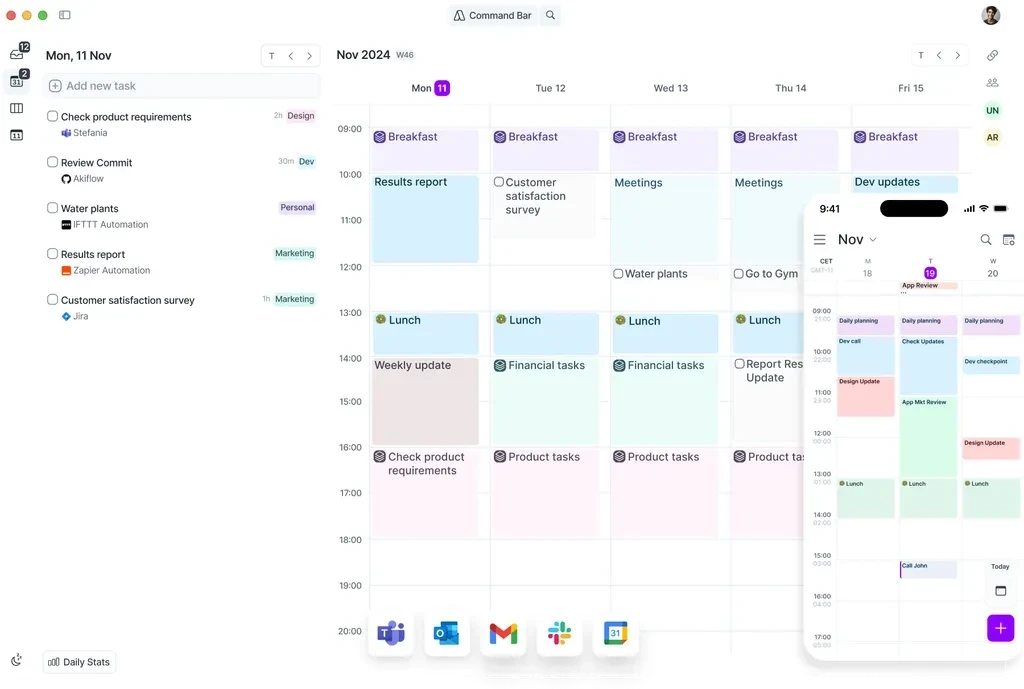
Best for: Power users who want fast task consolidation from many sources and manual time blocking without delegating decisions to AI
Akiflow occupies the manual-control end of the scheduling spectrum. It pulls tasks from Notion, Linear, Gmail, Jira, Slack, Asana, Trello, and 30+ other sources into a unified inbox, then gives you keyboard shortcuts to schedule them into your calendar. You make every scheduling decision — Akiflow just makes those decisions faster via a command bar and drag-and-drop calendar integration.
Pros:
Task consolidation from 30+ sources into one unified inbox
Command bar for fast task capture and scheduling via keyboard
Smart scheduling links — share availability for external meetings
AI tagging automatically categorises and organises tasks on import
Available on Mac, Windows, and mobile (beta)
Cons:
$19/month annually ($34/month monthly) — same as Motion on monthly
No AI auto-scheduling — you make every scheduling decision manually
No historical analysis of scheduling performance
No free tier — 7-day trial only
Mobile app still in beta
Pricing: $19/month billed annually ($34/month monthly). 7-day free trial.
Calendars: Google Calendar, Outlook, iCloud.
10. Sunsama — best for intentional guided daily planning
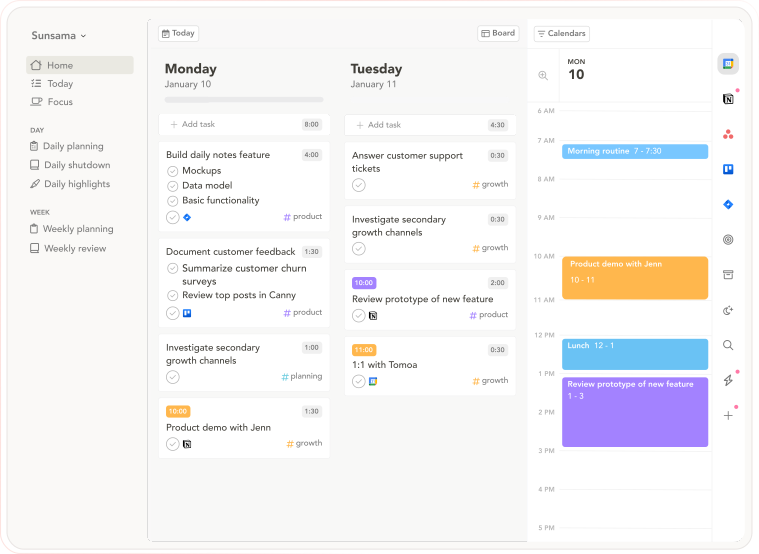
Best for: People who want intentional daily planning as a deliberate counterpoint to automated scheduling — slow, guided, and ritualistic
Sunsama is the philosophical opposite of auto-scheduling tools: instead of AI building your day, Sunsama walks you through building it deliberately yourself. The morning ritual asks you to pull tasks from connected tools, estimate time against your calendar, and commit to the plan. The evening shutdown reviews completion. The commitment is the point — you chose it, which preserves the psychological ownership that automation removes.
Pros:
Guided daily planning ritual — pulls tasks from connected tools, estimates time, locks in a realistic day
Daily Shutdown feature — structured end-of-day review and reflection
Integrations with Asana, Trello, Notion, ClickUp, Todoist, Gmail, Slack, Linear, Jira
Cross-platform: macOS, Windows, web, iOS, Android
14-day free trial, no credit card required
Cons:
$20/month annually — expensive for a planning layer
No AI auto-scheduling — everything is manual
The daily ritual takes 15–20 minutes; speed-oriented users find it slow
No AI analysis of historical scheduling patterns
Pricing: $20/month billed annually ($26/month monthly). 14-day free trial, no credit card required.
Calendars: Google Calendar, Outlook.
11. Structured — best visual timeline planner for simple day scheduling
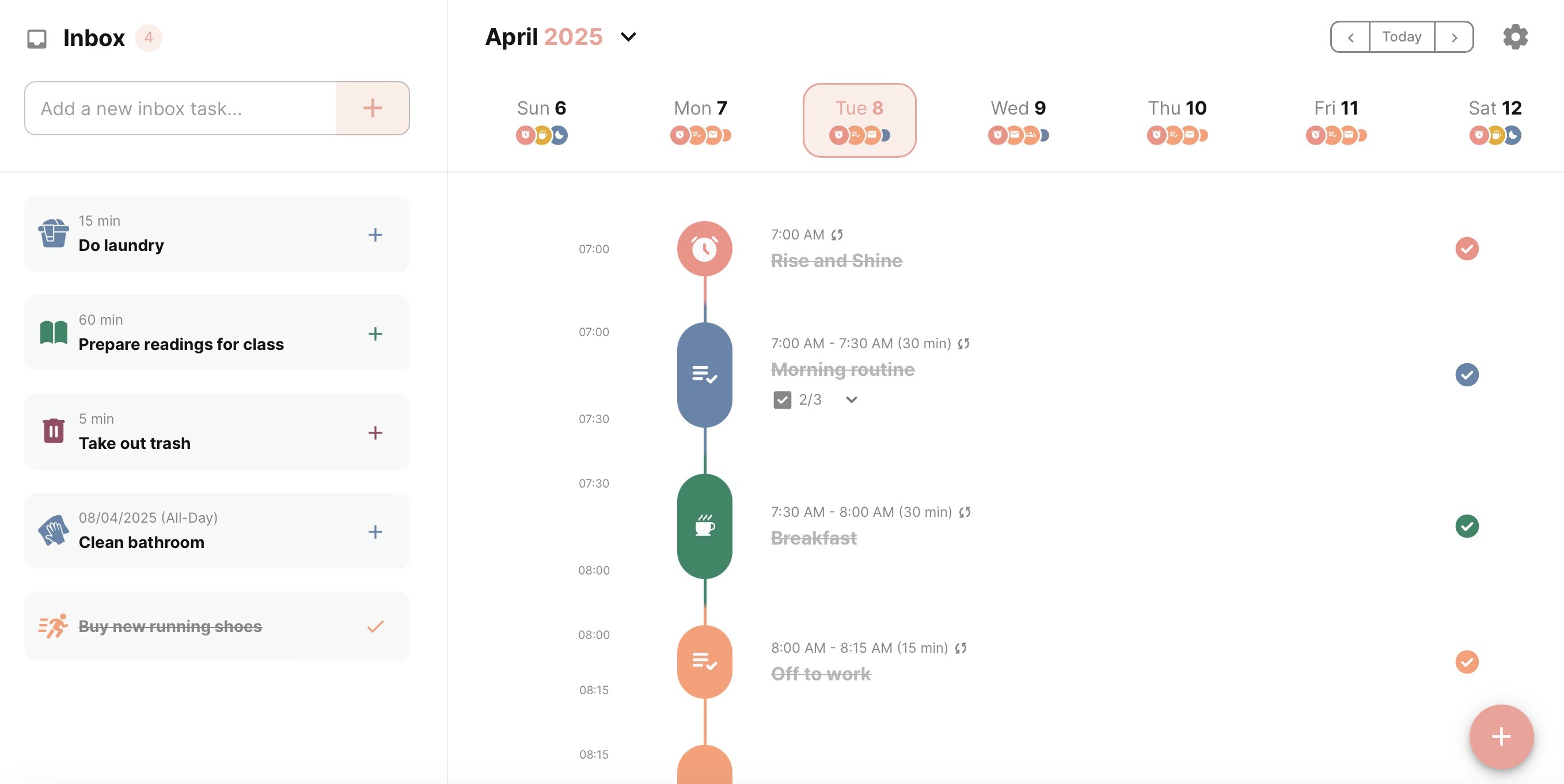
Best for: Visual thinkers who want a simple timeline view of their day with drag-and-drop task scheduling on Apple devices
Structured presents your day as a clean visual timeline — tasks and events stacked vertically with colour-coded blocks. Drag tasks up and down to reschedule. The simplicity is the point: no AI, no complex integrations, just a visual day plan you can build and adjust in seconds.
Pros:
Visual timeline makes your day structure immediately clear
Simple drag-and-drop scheduling
Lifetime purchase option at $64.99 — no subscription needed
Apple-native: Mac, iPhone, iPad, Apple Watch
Import events from Apple Calendar and Google Calendar
Cons:
No AI features of any kind
No deep calendar sync — imports events but doesn't fully integrate
No productivity analysis or weekly and daily reports
Apple only — no Windows or Android
Limited task management compared to Todoist or Things 3
Pricing: Free tier. Pro: $6.49/mo, $19.99/yr, or $64.99 lifetime.
Calendars: Apple Calendar, Google Calendar (import).
The calendar and the system
Most calendar apps show your schedule. A few build a system around it. The distinction matters because the schedule itself is rarely the bottleneck — it's what happens between the events that determines your output. Aftertone is the only Mac calendar app that tracks what happens during your day and reports back on whether your schedule is actually working.
Frequently asked questions
What is the best Mac calendar app in 2026?
For most Mac users, Apple Calendar is sufficient and costs nothing. For power users who want natural language input and Apple-native design, Fantastical at $57/year is the premium pick. For full AI auto-scheduling, Motion. For cross-platform AI planning with human approval, Morgen. For productivity intelligence with a Focus Screen and weekly review, Aftertone. The best choice depends on whether your bottleneck is the calendar interface, the scheduling layer, or the execution and review layer.
What is the best free Mac calendar app?
Apple Calendar is the best free Mac calendar — already installed, syncs across all Apple devices, and handles Google Calendar and Exchange accounts. Notion Calendar is the best free third-party option, especially for Notion users. Google Calendar is free and works everywhere, though web-only on Mac. All three are solid before deciding whether a paid app is worth it.
Which Mac calendar apps are truly Mac-native?
Apple Calendar, Fantastical, BusyCal, Aftertone, Structured, and Notion Calendar all ship as true native Mac apps. Morgen, Akiflow, Sunsama, and Motion use Electron or web wrappers — they work on Mac but don't feel as native. For the most Mac-native third-party experience, Fantastical or BusyCal are strongest. Aftertone adds productivity intelligence that the native apps lack.
How much does Aftertone cost?
Aftertone is $30/month with a 7-day free trial, no card required. It covers calendar and task management, Focus Screen for single-task execution, and AI weekly and daily reports. BusyCal and Structured offer lifetime purchase options for users who prefer one-time pricing.
What is the difference between Motion and Morgen?
Both are AI-powered, but with different philosophies. Motion auto-schedules everything — you add tasks and it places them without asking. Morgen suggests placements and waits for your approval. Motion is better for users who want full automation. Morgen is better for users who want AI assistance while retaining control. Motion also includes task management; Morgen is primarily a calendar layer on top of existing task tools.
Is Fantastical worth it in 2026?
Yes, for Apple ecosystem users who add a high volume of events daily. Fantastical's natural language parsing — "Team standup every weekday at 9:15am starting next Monday" — is the fastest event entry available on any platform, and Calendar Sets let you switch between work, personal, and focus contexts in one click. At $4.99/month or $39.99/year, it's worth it if you interact with your calendar dozens of times a day. For light calendar users, Apple Calendar or Notion Calendar are adequate at zero cost.
What replaced Clockwise for Mac users?
Clockwise shut down in March 2026. The closest replacements: Reclaim AI for automated focus block scheduling in Google Calendar, Morgen for AI planning suggestions you approve, and Aftertone for Mac users who want scheduling pattern analysis and focus protection. Full comparison at Best Clockwise Alternatives 2026.
Can I use Google Calendar on Mac without a browser?
There is no native Google Calendar app for Mac. Fantastical, Morgen, Notion Calendar, and Aftertone all sync Google Calendar natively and display it in a native Mac interface.
What is the best Mac calendar app without a subscription?
BusyCal is the strongest one-time purchase Mac calendar app — available on the Mac App Store with deep native features, custom views, and reliable multi-account sync. Structured also offers a lifetime purchase ($64.99). Aftertone is subscription-based at $30/month with a 7-day free trial, no card required.
Is Apple Calendar good enough for most Mac users?
Yes — for casual to moderate calendar users, Apple Calendar is adequate and costs nothing. Gaps become relevant when you need natural language event creation (Fantastical), time blocking support (Aftertone, Akiflow), AI scheduling (Motion, Morgen), or cross-platform access beyond Apple devices (Google Calendar, Morgen). Most people who upgrade do so for one specific missing capability.
